Embed script
The Sill embed script is one <script> tag you add to your pages. On each page load it sends Sill one small report of the visit (which browser or agent it was, and which page), and adds links in your page’s <head> that point agents to your signed agent card, MCP server and catalog. It never breaks your page: if anything fails, it stops silently.
Install it
Section titled “Install it”Paste the snippet before </body> on every page, usually in your site-wide layout. Copy your own values from Settings → Install → Endpoint → Install snippet.
<!-- paste before </body> --><script async src="https://cdn.sill.so/embed.js" data-site-key="us_…" data-proof-token="pf_…"></script>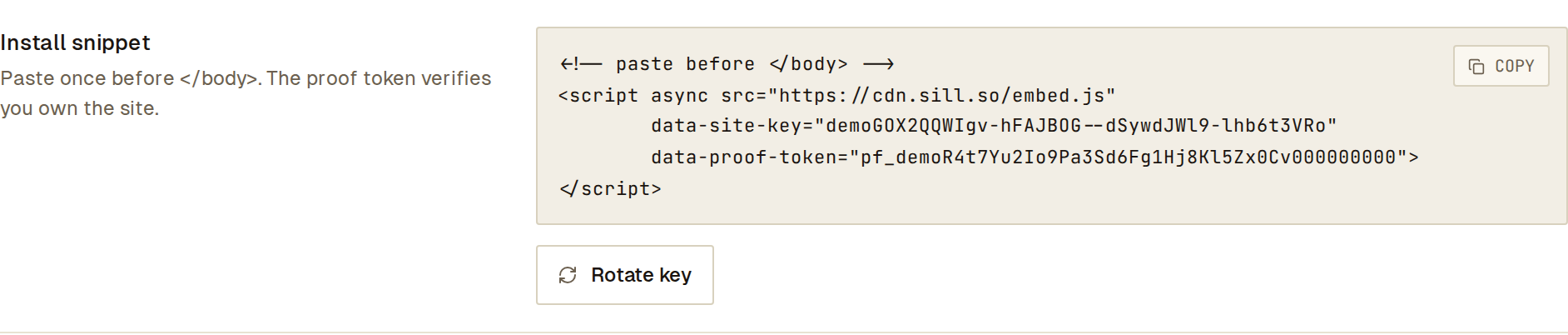 Copy the snippet with your site’s own key and proof token.
data-site-keytells Sill which site the visit belongs to. It is public by design, like a Stripe publishable key: anyone can see it in your HTML, and it grants no access to your account. During onboarding it is shown as a key that starts with your region (us_…); later, Settings → Install shows a 43-character form of the same key. Either one works.data-proof-tokenlets Sill confirm you control the domain: Sill fetches your homepage and looks for it. The script itself never reads or sends it. It is also safe to publish.- Keep
async(or usedefer) so the script never delays your page.
Settings → Install → How Sill is installed shows when the first report from the script has reached Sill. Reports are recorded once your domain is verified. If you use Cloudflare or WordPress, see What each install covers: a Cloudflare Worker or the WordPress plugin adds this script for you.
What it sends
Section titled “What it sends”One JSON request per page load to https://edge.sill.so/v1/discovery/ingest, using navigator.sendBeacon (or fetch with keepalive and no credentials). It does not retry and does not read the response.
{ "site_key": "us_…", "schema_version": "1", "observed_at": "2026-10-01T15:00:00.000Z", "identification": { "user_agent": "Mozilla/5.0 …", "client_hints": { "sec_ch_ua": "\"Chromium\";v=\"128\", \"Not;A=Brand\";v=\"24\"", "sec_ch_ua_mobile": "?0", "sec_ch_ua_platform": "\"macOS\"" }, "referrer_origin": "https://northwind-coffee.example" }, "page_context": { "page_path": "/products/ethiopia-guji", "page_query": "?q=decaf" }}| Field | Source |
|---|---|
identification.user_agent | navigator.userAgent, cut to 512 characters. |
identification.client_hints | Browser brand, mobile flag and platform from navigator.userAgentData (Chromium browsers only). |
identification.client_hints.sec_ch_ua_sill_agent | A <meta name="sec-ch-ua-sill-agent"> tag, if the page has one. |
identification.agent_card_claim | A <meta name="sill-agent-card"> tag, if the page has one, passed as-is. |
identification.referrer_origin | Your page’s own origin (location.origin). |
page_context.page_path, page_context.page_query | The page path and query string, each cut to 1,000 characters. They power the top-pages and search-term views. |
visitor.vid, visitor.sid | A random visitor ID and session ID the script keeps in the browser (see Returning visitors). |
Fields are left out when there is nothing to send.
The script does not read form fields or page content, document.referrer, screen size, installed plugins or languages, or any cookie or stored value other than its own two IDs, and it does not use canvas, WebGL or audio to identify devices.
Returning visitors
Section titled “Returning visitors”Returning-visitor tracking lets you see the same person come back, last month and again today. It is off until you turn it on for a site in Settings → General → Returning visitors (owners and admins). How to use it in the dashboard is in Returning visitors. While it is off, the script stores nothing in your visitors’ browsers and removes anything it stored before.
When it is on, the script keeps two random IDs on your domain:
| Name | Where | Kept for | What it is |
|---|---|---|---|
sill_vid | Local storage (_sill_vid cookie only if local storage is unavailable) | 13 months | A random visitor ID. It contains nothing about the person. |
sill_sid | Local storage (_sill_sid cookie only if local storage is unavailable) | 30 minutes without a page view | A random session ID. A new one starts after 30 idle minutes. |
Both stay on your own domain, are never shared with other sites, and are only sent to Sill with the visit report. When a browser keeps no storage, Sill recognises a returning visitor by their network and browser instead.
For people (not AI agents), Sill also records the IP address the visit came from. Sill stores it encrypted and shows it only in a visitor’s detail view, to account owners, admins and reviewers. Each time an address is shown, it is recorded in your account’s activity log. Visitor history, including IP addresses, is kept for 13 months after a visitor’s last visit. Forget this visitor deletes one visitor’s history at any time; if the same browser comes back, a new history starts.
Privacy signals and consent
Section titled “Privacy signals and consent”- Browsers that send Global Privacy Control are never given an ID.
- To wait for your cookie banner, add
data-sill-consent="required"to the script tag, and setwindow.sillConsent = trueonce the visitor agrees. IDs are kept from the next page view on. - To turn IDs off on a page, set
window.sillConsent = falseor adddata-sill-consent="denied".
<script async src="https://cdn.sill.so/embed.js" data-site-key="us_…" data-sill-consent="required"></script><script> // in your consent banner's "accept" handler window.sillConsent = true;</script>If your site shows a cookie notice, list sill_vid, sill_sid, _sill_vid and _sill_sid in it as analytics storage.
Links it adds to your page
Section titled “Links it adds to your page”Before sending the report, the script adds these tags to <head>, unless your page already has them:
<link rel="agent-card" type="application/json" href="https://edge.sill.so/v1/agent-card/SITE_KEY.json"><link rel="mcp" type="application/json" href="https://edge.sill.so/v1/mcp/SITE_KEY"><link rel="alternate" type="application/agent-card+json" href="https://your-domain/.well-known/agent-card.json"><link rel="ai-catalog" type="application/json" href="https://edge.sill.so/v1/catalog/SITE_KEY.json">Agents that read the page with JavaScript find your agent endpoints this way. For agents that do not run JavaScript, paste the HTML LINK TAG from Settings → Install → Endpoint → Agent card into your <head> directly.
Content Security Policy
Section titled “Content Security Policy”The script uses no eval, inline handlers or injected scripts. If your site sends a CSP, allow:
Content-Security-Policy: script-src 'self' https://cdn.sill.so; connect-src 'self' https://edge.sill.so;No 'unsafe-inline' or 'unsafe-eval' is needed.
Check your install
Section titled “Check your install”curl -I https://cdn.sill.so/embed.jsThen load a page with the snippet and open Settings → Install → How Sill is installed. If nothing arrives, open your browser console: a malformed data-site-key logs [sill] embed: aborting (invalid site_key). That is the only message the script ever logs.
The script is cached for five minutes, so a fresh copy reaches your visitors shortly after Sill updates it. Always load it from cdn.sill.so; a self-hosted copy would fall out of date.
What the script tag cannot see
Section titled “What the script tag cannot see”Most AI traffic, including GPTBot, ClaudeBot, Perplexity and Googlebot, fetches pages without running JavaScript, so the script never sees it. A script-tag-only install also does not serve /.well-known/agent-card.json or /llms.txt on your domain.
To cover those, use a Cloudflare Worker or the WordPress plugin, or add an agent-card redirect. See What each install covers.
Common questions
Section titled “Common questions”Does it slow down my site?
No. It loads async, waits until the page is interactive and the browser is idle, then adds four <link> tags, checks once whether returning-visitor tracking is on for your site (a small request your visitors’ browsers cache for five minutes), and sends one small report. The script is under 14 kB compressed.
Does it set cookies?
Not unless you turn on Returning visitors. Even then it uses local storage, and falls back to two first-party cookies on your own domain (_sill_vid, _sill_sid) only when local storage is unavailable. It reads no other cookies, and requests to Sill are sent without credentials.
Do I need it on every page? Put it in your site-wide layout so every page load is counted.