Payments
When your rules approve an agent order (or someone on your team approves a held order), Sill charges it on your connected Stripe account. Stripe holds the card, runs the charge, settles to your account and pays you out. Sill never holds the card or the money: it decides, asks Stripe to charge, and writes a signed record of the result.
Transactional features are in early access. Stripe is the payment rail today, in test or live mode. Shopify settlement runs in test mode only. To connect Stripe and choose the rail, see Connect payments.
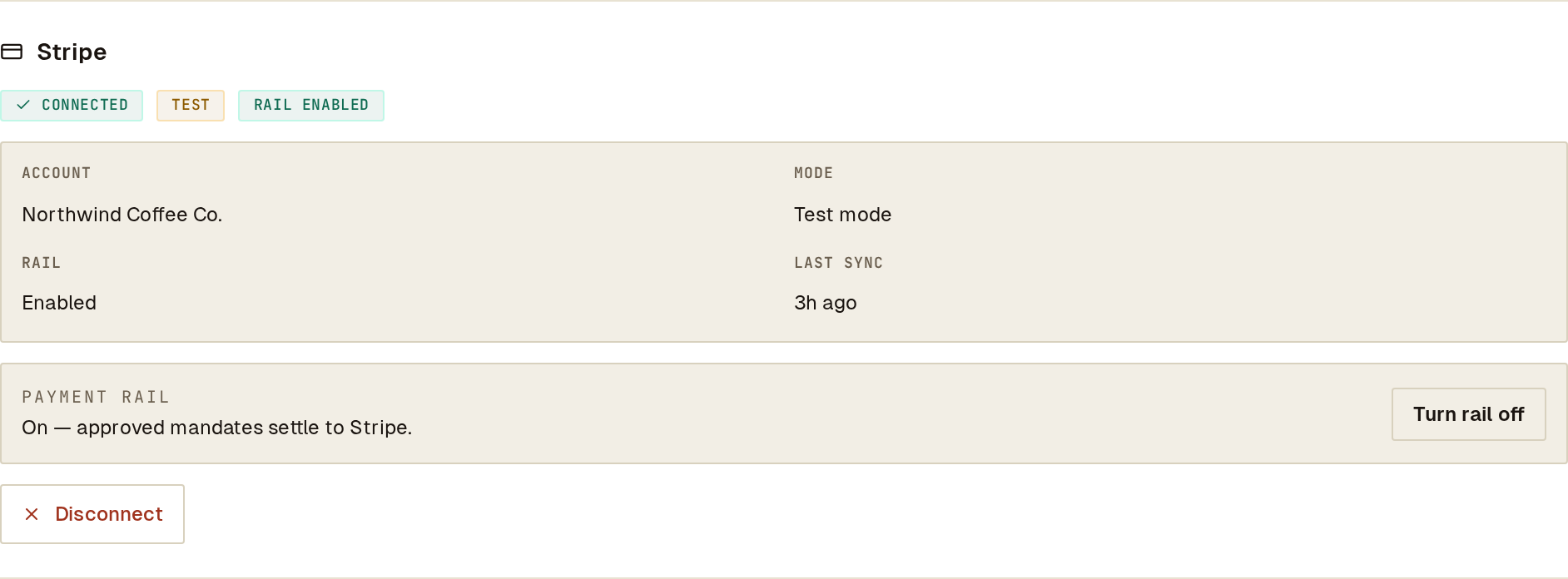 A connected Stripe account in test mode with the rail on, so approved orders are charged. Turn rail off stops charging.
How an approved order is charged
Section titled “How an approved order is charged”sequenceDiagram
autonumber
participant Agent
participant Sill
participant Stripe as Stripe (your account)
Agent->>Sill: Signed order
Sill->>Sill: Check the signature and run your guardrails
Sill-->>Agent: approved (with the record id)
Sill->>Sill: Pre-charge checks
Sill->>Stripe: Create the payment
Stripe-->>Sill: Succeeded, processing or failed
Sill->>Sill: Record the result (a signed settlement record on success)
The agent gets the decision straight away; the charge runs right after it. The result appears on the order’s record under Activity, and the order’s status in the list changes from APPROVED to CHARGED, CHARGE FAILED (Stripe refused the charge) or BLOCKED (Sill stopped it before calling Stripe).
Before calling Stripe, Sill checks that:
- Stripe is connected for the site and the rail is enabled.
- The Stripe connection belongs to your account and matches its mode (test or live).
- A payment method is set up for the site in that mode.
- The order is within the per-customer daily spend cap, if your rules set one.
- The order has not already been charged. Each order is charged at most once, even if Sill or Stripe retries the request.
If any check fails, nothing is sent to Stripe and the record says why (see When an order is not charged).
What gets charged
Section titled “What gets charged”- The amount comes from the signed order, never from anything the agent sends later. Sill charges the order’s quoted total when the agent signed one, otherwise the signed maximum amount. An order with several line items must carry a quoted total; without one it is not charged, because the maximum is a ceiling, not a price.
- The payment method. For signed orders, Sill charges the payment method saved for the site on your Stripe account; it is set up with you during early-access onboarding. For UCP checkout, the shopper pays with a one-time Google Pay token minted on your Stripe account.
- Card data. Sill only ever handles Stripe’s opaque tokens (
pm_…,tok_…). Card numbers never reach Sill.
Check a charge in Sill and in Stripe
Section titled “Check a charge in Sill and in Stripe”Open the order under Activity and switch to its ACTIVITY tab. The SETTLEMENT panel shows the rail, the amounts, the signed maximum the agent authorised and the Stripe payment id.
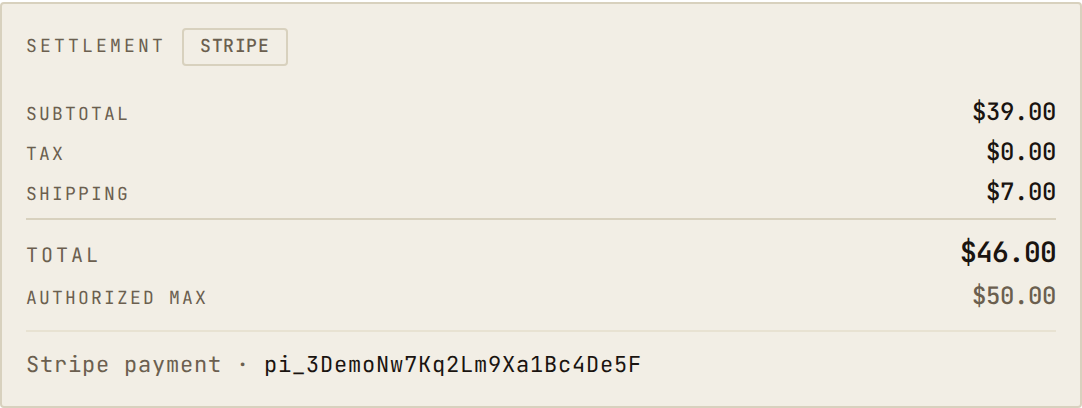 A charged order: the total stayed under the $50.00 the agent was authorised to spend.
In your Stripe dashboard the payment appears on your account with:
| Field | Value |
|---|---|
| Description | Sill mandate: northwind-coffee.example sku=NW-GRINDER-01 (the SKU is blank for multi-item orders) |
| Metadata | mandate_id, site_id, sill_record_id, sill_environment (test or live), payment_method_source_kind, and for multi-item orders sill_line_count and sill_line_items (for example NW-GRINDER-01×1, NW-FILTER-100×2) |
| Receipt email and shipping | The buyer’s email and shipping address, when the agent supplied them |
Use mandate_id or sill_record_id to find the same order in Sill’s Activity search.
What each Stripe result means
Section titled “What each Stripe result means”| Stripe result | In Sill | What to do |
|---|---|---|
succeeded | CHARGED; a signed settlement record is added | Nothing. |
processing | Pending until Stripe reports the final result | Nothing; the record updates when Stripe confirms. |
requires_action | CHARGE FAILED · Authentication required | The card needs the buyer to confirm (for example 3-D Secure), which an agent order cannot do. Use a payment method that does not require it. |
requires_payment_method | CHARGE FAILED · Card declined (or Stripe’s decline reason) | Check the payment in Stripe. |
canceled | CHARGE FAILED | Check the payment in Stripe. |
 A declined charge shows Stripe’s reason on the order’s record.
After the charge, Sill also records what Stripe reports later: refunds and disputes are added to the original order, and if you disconnect Sill from your Stripe dashboard, Sill stops charging on that connection. You do not need to configure webhooks for this.
When an order is not charged
Section titled “When an order is not charged”An order that Sill stopped before calling Stripe is listed as BLOCKED, with the reason on its SETTLEMENT panel. Nothing was sent to Stripe in any of these cases.
| Reason | Meaning | Fix |
|---|---|---|
| Rail disabled | Stripe is not enabled for this site. The order stays APPROVED and is not charged. | On the Stripe card in Settings → Integrations, click Turn rail on, or connect Stripe if it is not connected; connecting turns the rail on. |
| Credential missing | No active Stripe connection for the site (for example after a disconnect), or no payment method set up for the account’s mode. | Connect Stripe; contact Sill to set up the payment method. |
| Stripe account inactive | The Stripe connection on file does not belong to this account. | Reconnect Stripe. |
| Quoted total required | A multi-item order was signed without a quoted total. | The agent must sign the cart total. |
| Amount exceeds mandate / Currency mismatch | The charge would exceed the signed maximum or use another currency. | The agent must sign a matching amount and currency. |
| Daily user spend cap exceeded | The customer’s spend in the last 24 hours plus this order is over your per-customer daily cap. | Expected; adjust the cap under Rules if it is too low. |
| Cross-agent organization budget exceeded | The organization’s spend across all agents is over your organization-wide cap. | Expected; adjust the cap if needed. |
Test mode and live mode
Section titled “Test mode and live mode”The mode follows the Stripe account you connected: a test-mode connection charges Stripe test cards, a live connection charges real cards. Settings → Integrations shows a TEST or LIVE badge on the Stripe card. The badge is not a switch; going live means connecting a live Stripe account, and live charges are enabled for your account during early-access onboarding.
WooCommerce stores
Section titled “WooCommerce stores”WooCommerce cannot run a server-side charge, so on a WooCommerce site agent orders are charged on your connected Stripe account exactly as above. After Stripe confirms the payment, Sill creates the order in WooCommerce so it shows up with your other orders:
- Marked paid, with payment method Stripe (via Sill) and the Stripe payment id as the transaction id.
- The item from your synced catalog, with its total equal to what was actually charged. Multi-item orders are charged but not written to WooCommerce.
- Each agent order is created once; Sill retries a failed write a few times, and a write that still fails never undoes the Stripe charge.
- Refunds made through Sill are recorded on the same WooCommerce order without asking any WooCommerce gateway to move money.
This needs WooCommerce REST API keys with Read/Write permission. With read-only keys the Stripe charge still succeeds, but the order is not written to WooCommerce.
Current limits
Section titled “Current limits”- Stripe is the only payment rail that settles in live mode.
- Shopify settlement runs in test mode only, against Shopify’s test endpoints.
- Agentic checkout through Stripe (ACP) is not available to merchants. See Agentic checkout (Stripe ACP).
- x402 is not supported.
Frequently asked
Section titled “Frequently asked”Does Sill ever hold the card or the money?
Section titled “Does Sill ever hold the card or the money?”No. Stripe holds the card, charges it on your connected account, settles to that account and pays you out. No money passes through a Sill account. Sill holds no PCI certification; it keeps card data out of its systems by handling only Stripe tokens. See Compliance.
Can the agent choose the amount?
Section titled “Can the agent choose the amount?”No. The amount comes from the signed order: the quoted total, or the signed maximum for a single item. Nothing the agent sends after signing changes it.
Can an order be charged twice?
Section titled “Can an order be charged twice?”No. Every Stripe request for an order carries the same idempotency key, so a retry returns the original payment instead of creating a new one.
How are refunds handled?
Section titled “How are refunds handled?”An agent asks for a refund with a second signed request; it goes through your guardrails and is refunded on the same rail as the original. See Refunds.
Can I turn on payments today?
Section titled “Can I turn on payments today?”Transactional features are in early access and are set up with you. Contact us through the email on sill.so. Discovery is free and needs no Transactional access.