Agent card
The agent card is a signed JSON file that tells AI agents what your store is and what they can do there: its name, the skills it offers, and where its MCP server and catalog live. Sill publishes one for every verified site, signs it, and keeps it current as you change skills. It follows the A2A agent-card format.
Find your card
Section titled “Find your card”GET https://edge.sill.so/v1/agent-card/{site_key}.jsonOpen Settings → Install → Endpoint → Agent card. It shows:
- PUBLISHED or NOT PUBLISHED. The card is published once your domain is verified.
- LIVE CARD URL: your signed card, with copy and open buttons.
- HTML LINK TAG: a
<link rel="agent-card">tag to paste into your<head>, so agents that read HTML find the card without running JavaScript. - Download agent-card.json: a small file for
/.well-known/agent-card.jsonthat points to your live card.
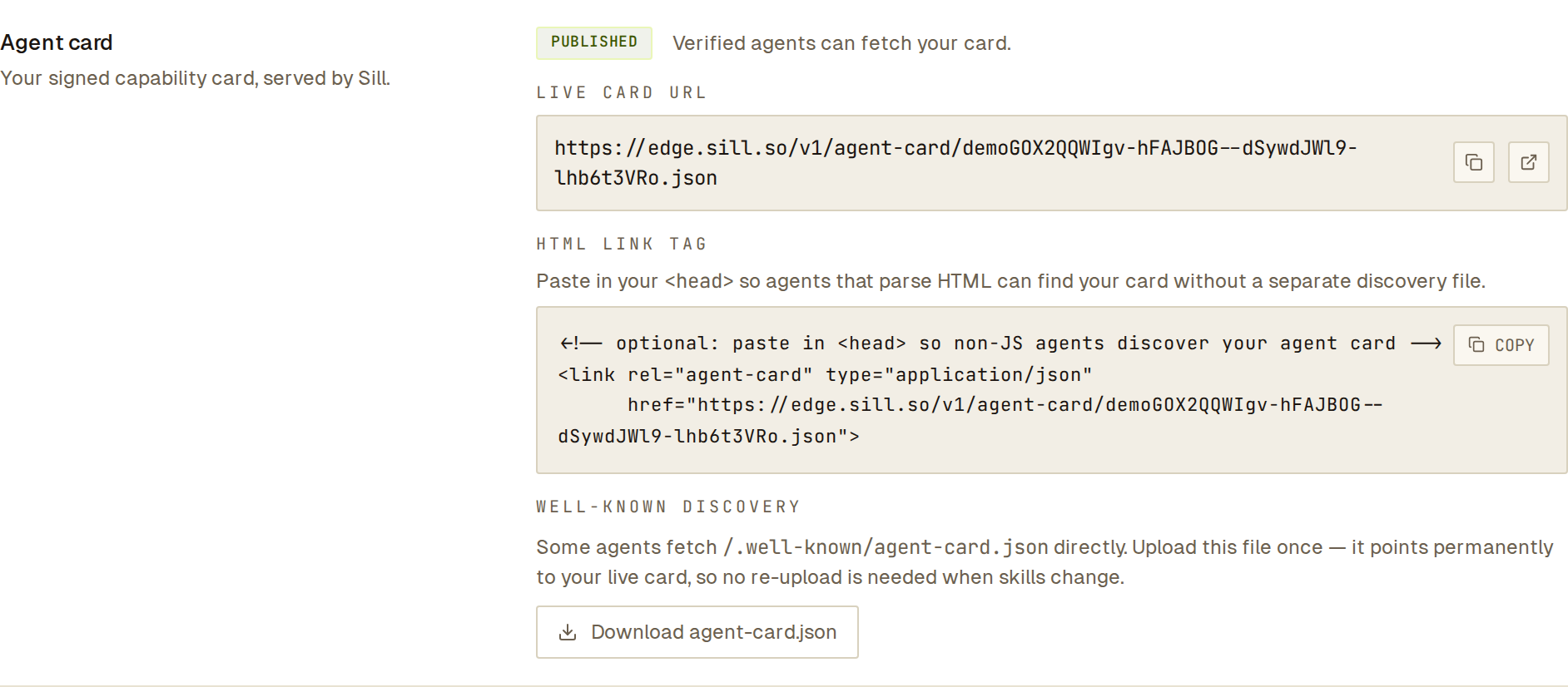 Copy the live card URL or the link tag from here.
To change your store description and the store facts on the card, open Agent readiness for the site, open the agent card check and click Edit card. Skills are managed in Settings → Skills; the card picks up changes within about a minute.
Publish it on your own domain
Section titled “Publish it on your own domain”A2A agents look for the card at https://your-domain/.well-known/agent-card.json. How it gets there depends on your install:
| Install | /.well-known/agent-card.json on your domain |
|---|---|
| Cloudflare Worker or WordPress plugin | Served automatically. |
| Shopify app | Shopify reserves /.well-known/. The card is served at https://your-store.myshopify.com/apps/sill/agent-card.json instead. See Install on Shopify. |
| Script tag only | Add a one-line redirect to your live card URL (preferred), or upload the downloaded file. |
See What each install covers for the full picture.
Which skills the card lists
Section titled “Which skills the card lists”The card’s skills[] lists the skills that are live for your store: enabled in Settings → Skills and backed by something that can answer them. place_order and request_refund appear only after you connect a store or payment provider (for example Shopify or Stripe). A site with no live skills lists none; Sill does not fill the card with the default skills. Your agent card, MCP server tools/list, ARD catalog and /agent page always list the same skills. See Skills.
Listing a skill on the card is an advertisement, not a promise that a particular call will succeed; orders and refunds still go through your guardrails.
What the card contains
Section titled “What the card contains”| Field | What it holds |
|---|---|
schema_version | "2" |
protocol_version | "a2a/1.2" |
name | Your domain. |
description | One line about your store (up to 200 bytes), from your agent-card description or a generic line for your domain. |
version | "1.0" |
supportedInterfaces[] | Your MCP server (JSONRPC, 2.0) and your signed catalog (HTTP+JSON, 1.0). |
defaultInputModes, defaultOutputModes | ["application/json"] |
site | Site id, display name, domain and sill_endpoint, the URL agents send signed mandates to: https://edge.sill.so/v1/m/{site_key}/mandate. |
skills[] | One entry per live skill: id, name, description, tags, examples, input and output modes, input_schema, auth_required. |
capabilities | A2A transport flags (streaming, pushNotifications, stateTransitionHistory), all false. |
mcp_endpoint | Your MCP server URL. |
catalog_endpoint | Your signed ARD catalog URL. |
llms_txt_endpoint | Your llms.txt on Sill’s edge. |
policy | policy_version ("discovery-v1") and mode ("discovery"). |
profile | The longer store description and store facts you confirmed (for example shipping zones), when set. |
signing | algorithm ("ed25519"), signing_key_id, issued_at, expires_at, envelope_signature. |
A trimmed example:
{ "protocol_version": "a2a/1.2", "name": "northwind-coffee.example", "description": "Small-batch specialty coffee roasted in Portland, Oregon.", "version": "1.0", "skills": [ { "id": "browse_catalog", "name": "Browse catalog", "description": "Search and browse the product catalog", "auth_required": false } ], "mcp_endpoint": "https://edge.sill.so/v1/mcp/SITE_KEY", "catalog_endpoint": "https://edge.sill.so/v1/catalog/SITE_KEY.json", "signing": { "algorithm": "ed25519", "signing_key_id": "sill-card-ed25519-v1-5f03060ef5f77675", "issued_at": "2026-10-01T15:00:00.000Z", "expires_at": "2026-10-01T15:15:00.000Z", "envelope_signature": "…" }}Verify the signature
Section titled “Verify the signature”signing.envelope_signature is an ed25519 signature over the JCS-canonical (RFC 8785) form of the card with envelope_signature removed, so every other field is covered. The public key is published at:
GET https://edge.sill.so/.well-known/jwks.jsonIts kid matches signing.signing_key_id. Anyone can verify a card with standard ed25519 tooling; see Verify a signature.
Responses
Section titled “Responses”| Situation | Status | Body |
|---|---|---|
| Verified site | 200 | The signed card. Cache-Control: public, max-age=60. Each card’s signing.expires_at is 15 minutes after its issued_at, so a cached card is still valid when an agent reads it. |
| Site exists but the domain is not verified yet | 404 | {"status":"pending_verification","message":"…"}. Agents treat the site as having no card. |
| Unknown or malformed site key | 404 | {"error":"not_found"} |