Custom skills
Beyond the seven default skills, you can add custom skills: actions specific to your store, such as booking a tasting or requesting a wholesale quote. Sill lists them on your signed agent card and in your MCP server’s tools/list, relays agent calls to an endpoint you run, and records every call in your audit log.
Owners and admins add custom skills in Settings → Skills.
Choose how the skill is fulfilled
Section titled “Choose how the skill is fulfilled”| Fulfillment | What Sill does when an agent calls the skill |
|---|---|
| Advertised | Lists the skill; you follow up yourself. The agent gets a “recorded” response and nothing is executed. No endpoint needed. |
| Live webhook | Sends the call to your HTTPS endpoint as a signed JSON POST and returns your response to the agent. |
| MCP server | Sends the call to your own MCP server as a signed tools/call and returns the result to the agent. |
The endpoint for Live webhook and MCP server must be an HTTPS URL on the domain you verified for this site, or one of its subdomains. Sill sends requests from its own servers and never relays to any other host.
Add a custom skill
Section titled “Add a custom skill”- In Settings → Skills, click Add custom skill.
- Enter a Display name. The Skill ID fills in automatically (lowercase letters, digits and underscores); you can change it.
- Enter a one-sentence Description. Agents decide whether to call the skill from this text.
- Choose the Fulfillment and, for Live webhook or MCP server, the Fulfillment endpoint.
- Click Add skill. Sill checks that the endpoint is reachable.
- For Live webhook or MCP server, copy the secret from Copy your webhook secret. It is shown once.
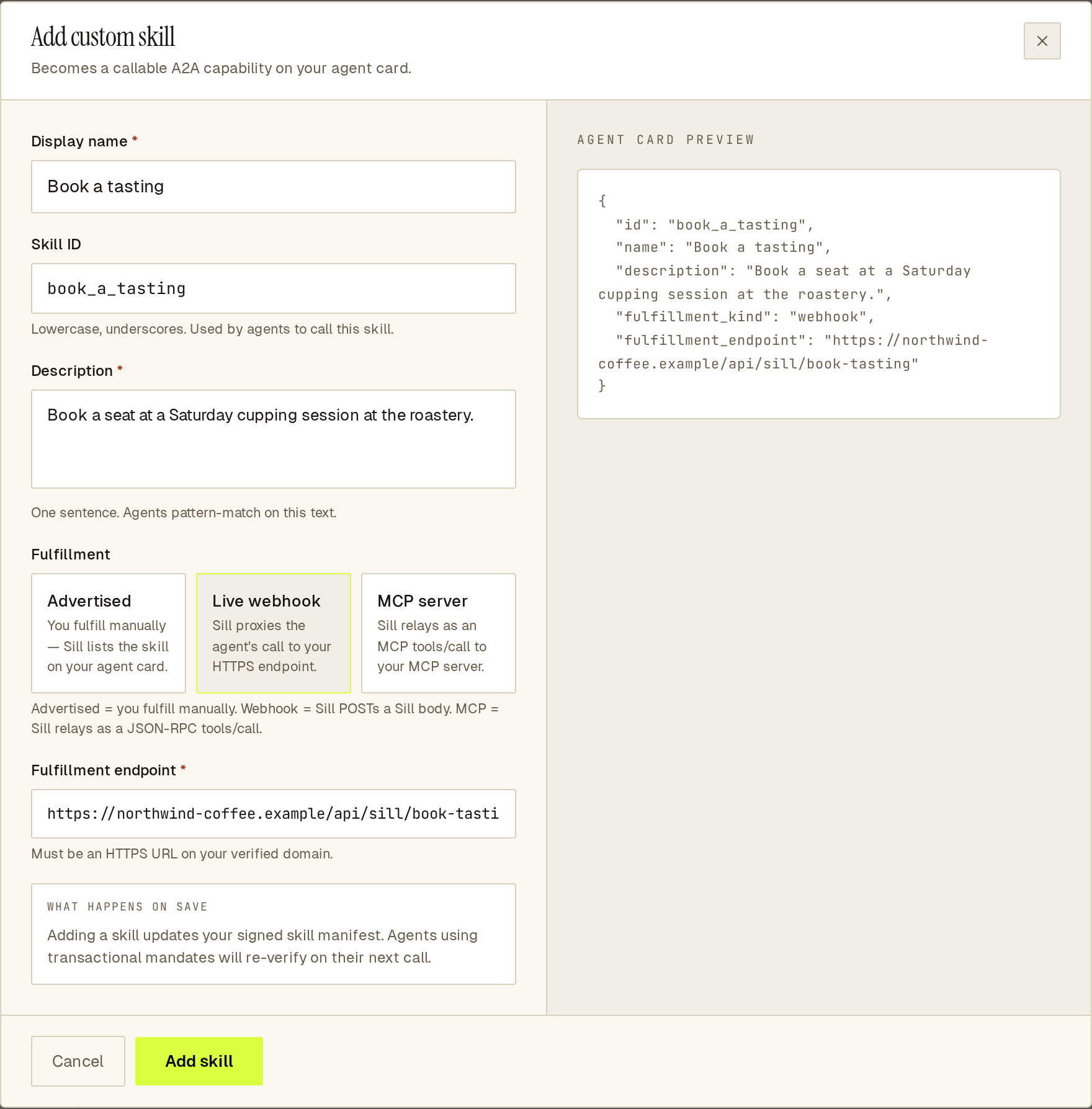 The preview on the right shows the skill you are adding.
Each custom skill row in Settings → Skills shows its endpoint with HEALTHY or UNREACHABLE, plus Edit endpoint (Sill checks the endpoint again when you save) and Rotate secret.
Check Sill’s signature
Section titled “Check Sill’s signature”Every request carries:
X-Sill-Signature: t=<unix-seconds>,v1=<hex>X-Sill-Nonce: <per-call id>X-Sill-Skill-Id: <skill_id>v1 is the hex HMAC-SHA256 of <t>.<raw request body>, keyed with your skill’s secret (the same scheme as Stripe webhooks). Recompute it over the exact bytes you received, compare, and reject requests whose t is too old. If you lose the secret, use Rotate secret to get a new one and update your endpoint.
What your endpoint receives and returns
Section titled “What your endpoint receives and returns”Sill waits up to 5 seconds for a response. Requests are at most 16 KB; responses must be at most 64 KB of JSON.
Live webhook
Section titled “Live webhook”{ "skill_id": "book_a_tasting", "site_id": "01JDEMOSITE00000000000MAIN", "arguments": { "date": "2026-10-10", "seats": 2 }, "observed_at": "2026-10-01T15:00:00.000Z", "nonce": "<per-call id>"}Return 2xx with a JSON body. That JSON is passed to the agent after Sill removes anything unsafe from it.
MCP server
Section titled “MCP server”{ "jsonrpc": "2.0", "id": "<per-call id>", "method": "tools/call", "params": { "name": "book_a_tasting", "arguments": { "date": "2026-10-10", "seats": 2 } }}Your server must answer this single request without an initialize handshake, echo the same id, and return a JSON-RPC result. Sill passes result.structuredContent to the agent when present, otherwise result.content.
When something goes wrong
Section titled “When something goes wrong”A non-2xx status, a timeout, a body that is not JSON, or (for MCP) a JSON-RPC error, an isError: true result or a mismatched id: the agent gets a short generic error, never your response text. The failed call is still recorded in your audit log. One failure does not take the skill offline: after 3 failed calls in a row, the skill is marked UNREACHABLE and your agent card, MCP server and catalog stop listing it. A successful call resets the count.
Sill re-checks an unreachable endpoint on its own, about 5 minutes later, then after 15 minutes, after 1 hour, and every hour after that, and lists the skill again when a check passes. To re-check straight away after a fix, use Edit endpoint and save.
Common questions
Section titled “Common questions”Do custom skills need a signed mandate?
No. Signed mandates are for orders and refunds, which go through place_order and request_refund and your guardrails.
Can a custom skill use the same id as a business skill?
No. The business skill ids (get_pricing, request_demo, sign_up, book_meeting, contact_support, get_status, get_trust_center) are reserved; turn those on under Business skills instead.
Can the endpoint be on another domain? No. It must be on the domain you verified for the site (or a subdomain), so agents know the answer comes from you.
See also
Section titled “See also”- Skills
- Business skills: link-returning skills for your pricing, sign-up, demo, booking, support, status and trust pages.
- Fulfill skills from your own endpoint: the same mechanism for the default read skills.
- MCP server
- Domain verification
- Audit envelope