Overview
Overview (AI agents on your site, at a glance.) is the first page you see for a site. It reports what AI agents did on that site over a time window you choose: how many calls they made, which pages they read and what they searched for, what your rules approved, held or blocked, and, once you take payments through Sill, the revenue agents brought in.
Open it from the main nav → Overview. Everything on it covers the site selected in the site picker; to see another site, switch sites.
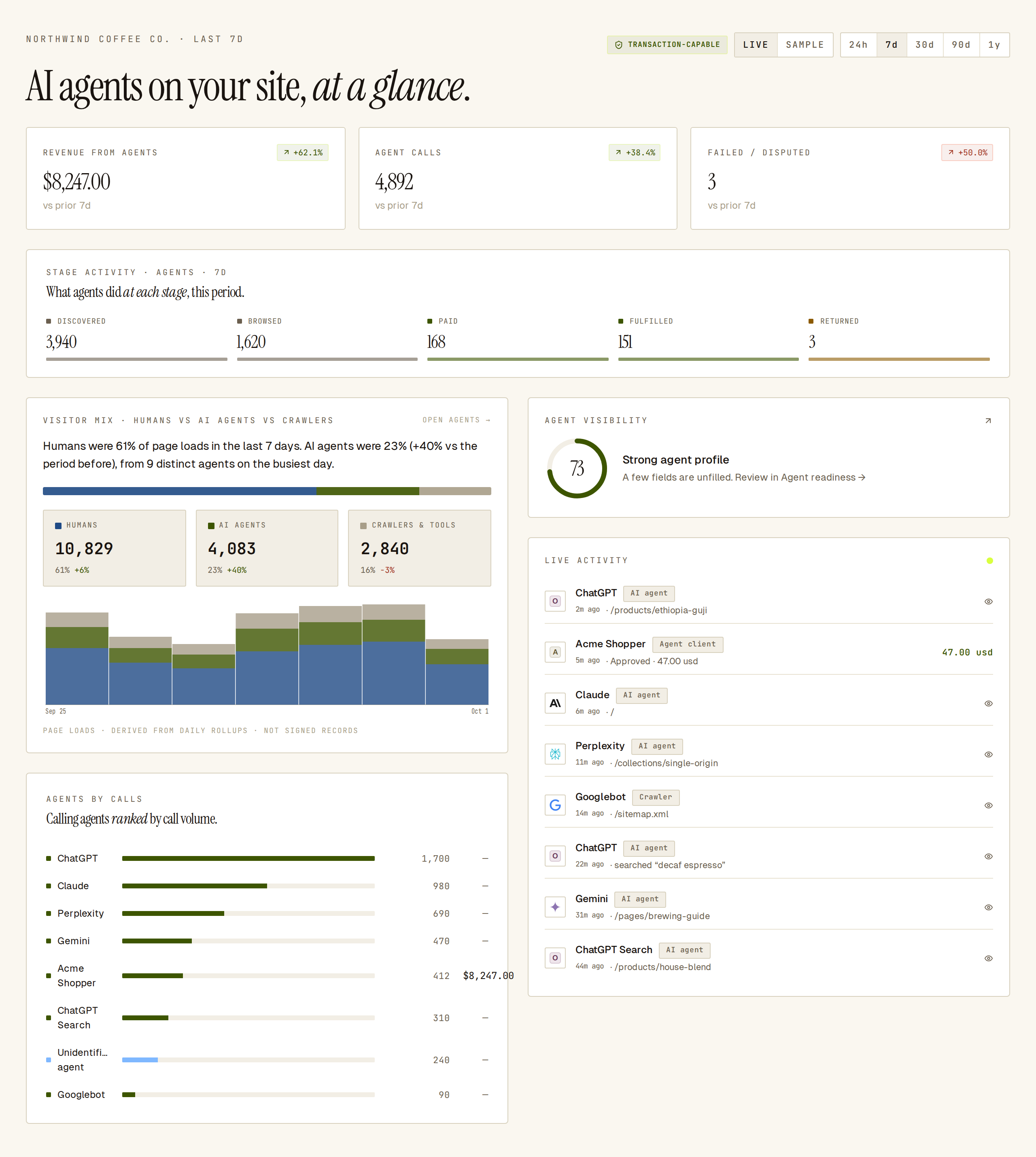 The Overview with LIVE and the 7d range selected.
Choose a time window
Section titled “Choose a time window”The buttons at the top right set the window for every card on the page: 24h, 7d, 30d, 90d or 1y. The default is 7d. There is no custom date range; for a longer or exact period, export the signed records from Audit log and export.
Next to the range buttons:
- LIVE | SAMPLE — LIVE shows your real data. SAMPLE fills every card with demo numbers so you can see what the page looks like before agents arrive; each card then carries a SAMPLE chip. Switch back to LIVE for your own numbers.
- A connection pill — TRANSACTION-CAPABLE or DISCOVERY ONLY.
The pill reads TRANSACTION-CAPABLE once the site has reached the transactional tier: its domain is verified and a connected store or payment account (for example Shopify or Stripe) confirms the same domain. Signed mandates and order dispatch work only from then on. Traffic alone does not change the pill.
Until then, the pill reads DISCOVERY ONLY and an amber banner reads Discovery only. This site has not reached the transactional tier yet. Agents can read your agent card and call read-only skills; signed mandates and connector dispatch are not enabled. Its Open integrations → button opens Settings, where you connect a store or payment provider.
Read the headline tiles
Section titled “Read the headline tiles”Three tiles sit at the top. Each shows the total for the window and the change versus the previous window of the same length (for example vs prior 7d).
| Tile | What it counts |
|---|---|
| Revenue from agents | Successful agent orders in the window, refunds excluded. $0 until you take payments through Sill. |
| Agent calls | Requests from a recognised agent. |
| Failed / disputed | Agent payments that failed or were disputed. Click the tile to open Activity. |
The change shows as — when the previous window had nothing to compare against, such as your first week of traffic. On Failed / disputed, a fall shows in lime and a rise in coral, because fewer is better; the arrow still shows which way the number moved.
Stage activity
Section titled “Stage activity”Stage activity counts agent activity at five stages: Discovered, Browsed, Paid, Fulfilled and Returned. Each stage is counted on its own, so it is not a funnel: a site can show more Paid than Browsed when agents order without browsing first.
Visitor mix and agents by calls
Section titled “Visitor mix and agents by calls”- Visitor mix splits page loads into Humans, AI agents and Crawlers & tools, with a one-line summary, the share and change for each, and a daily chart. Click a group to open the Agents view filtered to it. The figures are summaries refreshed every 15 minutes. On 1y this card shows the last 90 days. Humans are counted only on sites running the Sill script.
- Agents by calls ranks each calling agent by its number of calls, with the revenue it brought in.
Agent visibility
Section titled “Agent visibility”The AGENT VISIBILITY card shows the site’s agent-card visibility score out of 100 with a one-line status. Click it to open Agent readiness, which lists exactly what is missing and how to fix it.
Live activity
Section titled “Live activity”Live activity lists the most recent agent events: who visited, what kind of visitor it is, how well its identity was confirmed, and the page, search or order involved. It stays empty until agents reach your site.
The kind chip reads AI agent for a recognised AI assistant or AI crawler, Crawler for search crawlers, SEO tools and link previews, Agent client for a tool-calling client that reached your MCP server or another transactional endpoint (MCP, A2A, AP2, UCP), and Human for a plain browser.
AI operators and policy outcomes
Section titled “AI operators and policy outcomes”- AI operators groups recognised agents by the company that runs them (for example OpenAI or Anthropic) and shows each company’s share of calls.
- Policy outcomes splits every decision in the window into Observed (read-only visits), Approved, Escalated and Blocked. See Rules for the rules behind these decisions.
Top pages and search terms
Section titled “Top pages and search terms”Top pages lists the pages bots loaded most. Bot search terms shows what bots typed into your site search; a term that keeps coming up can point to a product or page you are missing.
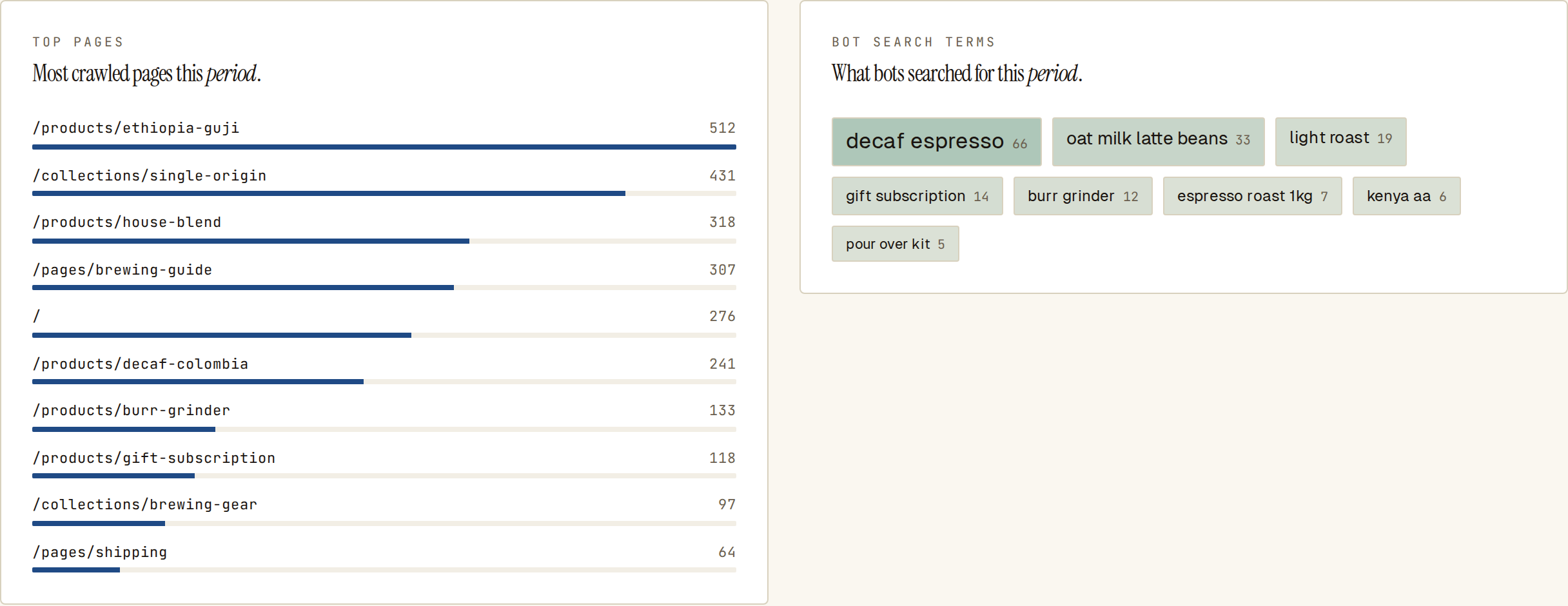 Top pages and bot search terms show where bots go on the site and what they look for.
Signed transactions and pending resolutions
Section titled “Signed transactions and pending resolutions”- Signed transactions lists recent settled agent payments: mandate, agent, items, amount and time. Open vault → opens Activity. The card is empty until your first agent payment.
- Pending resolutions lists orders your rules held for review. Click an order, or Review all →, to decide it in Held orders.
Blocked attacks and top skills
Section titled “Blocked attacks and top skills”- Blocked attacks lists the most common reasons your rules refused an agent request in the window, with a count for each.
- Top skills ranks the skills agents used most, such as
browse_catalog.
A new site with no traffic
Section titled “A new site with no traffic”Until agents reach the site, the tiles show 0 with — for the change, and the other cards show a short note on what will appear there. Switch to SAMPLE to preview the page with demo data.
Is the dashboard data signed?
Section titled “Is the dashboard data signed?”No. The dashboard shows summaries. Each underlying agent decision is a signed record; to check or keep that evidence, use Audit log and export and Verify a signature.
See also
Section titled “See also”- Agents — every agent, crawler and visitor in detail.
- Agent readiness — fix what agents cannot find or read.
- Held orders — review orders your rules held.
- Rules — the rules that approve, hold or block.
- Audit log and export — the signed records behind every figure.
- Transactional overview — taking agent payments, which fills in revenue and transactions.