Agency referral link
Your referral link is a sill.so/go/{name} address you share in your emails, proposals and website. When someone opens it and creates a Sill account, the new account is credited to your agency, and you see it under Agency Portal → Referral.
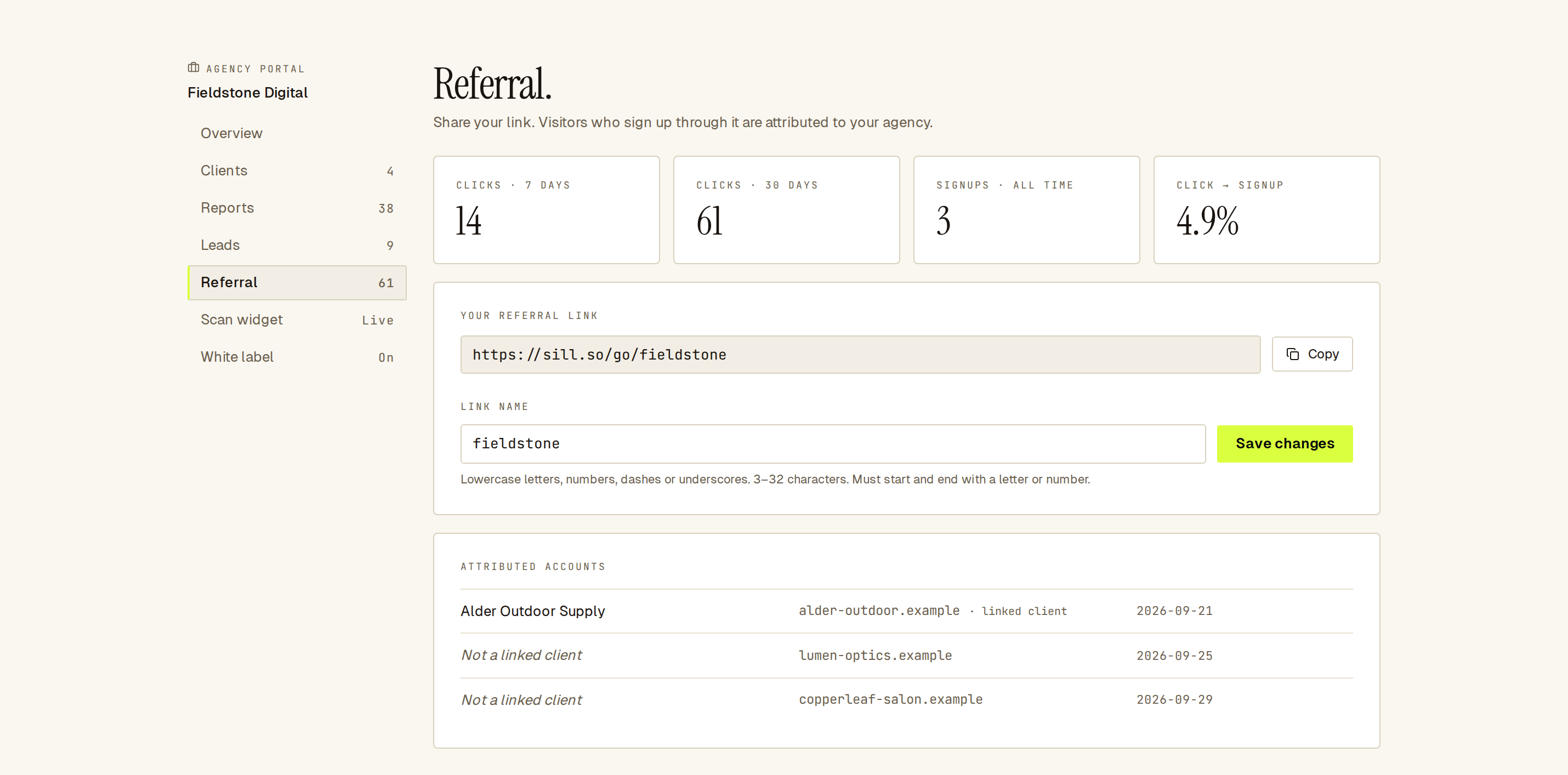 Your link, its clicks and signups, and the accounts credited to you.
How do I set up my referral link?
Section titled “How do I set up my referral link?”- Open Agency Portal → Referral.
- Under Link name, type a name, for example
fieldstone. - Click Create. Your link appears under Your referral link.
- Click Copy and share it.
Link names use 3 to 32 characters: lowercase letters, numbers, dashes or underscores, starting and ending with a letter or number. Some names are reserved, and each name can belong to one agency only.
To change the name, edit it and click Save changes. Links that use the old name stop crediting you, so update anywhere you shared it.
How are signups credited?
Section titled “How are signups credited?”- A visitor opens
https://sill.so/go/{name}and lands on the Sill homepage. - If they create a new Sill account, from that visit or within 30 days on the same browser, the account is credited to your agency.
- If they open more than one agency’s link before signing up, the most recent link is used.
- Once an account is credited, that does not change.
- Existing Sill accounts are not credited, and neither are signups by your own agency’s members.
The Sign-up button option on your branded reports uses the same link, so signups from a report you shared are credited to you too. See White label.
Visitors in the EU, EEA and UK
Section titled “Visitors in the EU, EEA and UK”For visitors in the EU, EEA and UK, Sill does not set the 30-day cookie. Their signup is credited when they create the account from the page your link opens.
What do the numbers mean?
Section titled “What do the numbers mean?”| Tile | Meaning |
|---|---|
| Clicks · 7 days / Clicks · 30 days | Visits to your link. |
| Signups · all time | New accounts credited to your agency. |
| Click → signup | Signups divided by 30-day clicks. Shown once you have at least 20 clicks in 30 days. |
Attributed accounts lists the credited accounts with their domain and signup date. An account that is also one of your clients shows its name and linked client; others show Not a linked client. To manage a credited account, ask its owner for access from Clients.