What each install covers
AI agents reach your site in four ways, and no single install sees all of them. This page shows what each Sill install covers, the smallest install that covers your kind of site, and where to check that it is working.
How agents reach your site
Section titled “How agents reach your site”| How the agent arrives | Examples | What sees it |
|---|---|---|
| Fetches the page without running JavaScript | ChatGPT, Claude, Perplexity, GPTBot, Googlebot — most AI traffic | Something in front of or inside your server: the Cloudflare Worker or the WordPress plugin |
| Runs a browser | ChatGPT Atlas, Comet, Claude in Chrome — and every human | The embed script |
| Calls Sill directly | MCP tools, the agent card, the catalog, llms.txt on edge.sill.so | Every install — these requests go to Sill, not to your server |
| Looks for a file on your domain | /.well-known/agent-card.json, /llms.txt, /agent | Only installs that serve or redirect that file on your domain |
A complete install therefore covers two layers — the browser and the server side — plus the discovery files on your domain.
The four layers Sill measures
Section titled “The four layers Sill measures”The install tabs in onboarding list what each install gives you under THIS INSTALL COVERS. After you install, Sill measures the same layers and shows them in two places: at the end of onboarding, and under Settings → Install → How Sill is installed (the card is headed WHAT SILL SEES ON your domain).
| Layer | Turns live when | What you get |
|---|---|---|
| Visitors & browser agents | A page view from the embed script reaches Sill | Humans, browser-mode agents, sessions, pages, searches |
| Crawlers that skip JavaScript | A request recorded by the Cloudflare Worker or WordPress plugin reaches Sill | Every crawler and agent that never runs JavaScript, with Cloudflare’s bot verification where available |
| Agent card & files | /.well-known/agent-card.json is served or redirected on your domain | Tools that read static files find your signed card |
| Your store | Shopify or WooCommerce is connected (shown only for stores) | Agents can read your catalog and orders |
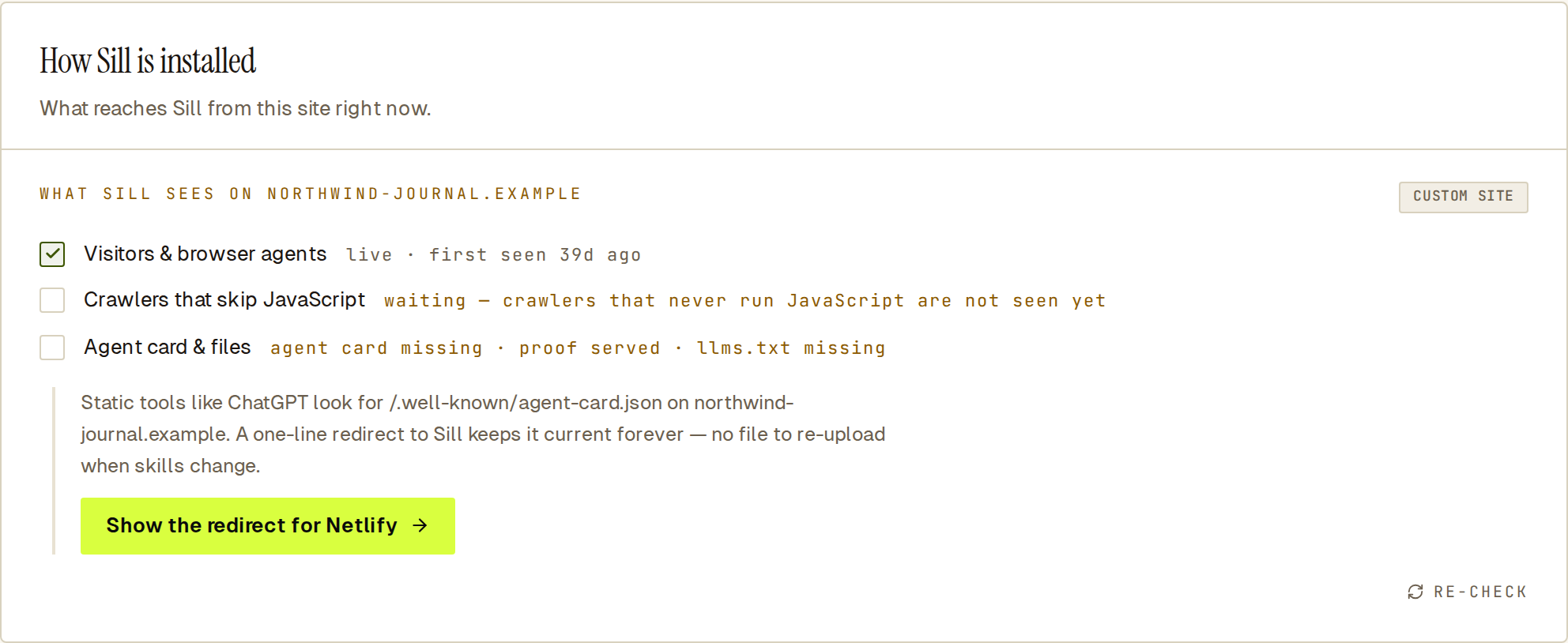 A script-tag-only site: the browser layer is live, and the card shows the one action that closes the next gap.
Each row shows a short status. live means Sill has seen a signal from that layer. waiting means nothing has arrived yet — for example waiting for the first page view. The files row lists each file as served, redirected or missing. On Shopify the crawler row reads not available on Shopify — protocol traffic is still recorded.
Below the rows, the card shows one next action, such as Deploy the Cloudflare Worker or Show the redirect for Netlify. Click RE-CHECK after you make a change. Results are kept for up to five minutes, so a change can take that long to show.
The minimum install for your site
Section titled “The minimum install for your site”| Your site | Install | Why |
|---|---|---|
| Any site behind Cloudflare | Cloudflare Worker | One install covers all three layers: it sees every request, serves the discovery files and adds the embed script. |
| WordPress or WooCommerce behind Cloudflare | Cloudflare Worker, not the plugin | Cloudflare answers cached pages before WordPress runs, so the plugin would miss those requests. |
| WordPress or WooCommerce, no Cloudflare | WordPress plugin | Sees every request that reaches WordPress, serves the discovery files and adds the embed. Connect WooCommerce afterwards for catalog and orders. |
| Shopify | Sill app | Covers the browser layer, the store and the agent card. Shopify offers no server-side hook, so crawlers that skip JavaScript are not seen. |
| Custom site, no Cloudflare | Embed script + agent card redirect | To see crawlers too, put Cloudflare in front of your site (free) and deploy the Worker. |
| Wix, Squarespace, Webflow, Framer | Embed script + agent card redirect | Paste the script in the site’s custom-code setting and, where the host allows it, add a 301 redirect for the card. |
Files the Worker and plugin serve on your domain
Section titled “Files the Worker and plugin serve on your domain”The Cloudflare Worker and the WordPress plugin serve these paths from your own domain, so a crawler finds everything without knowing about Sill:
| Path on your domain | What it is |
|---|---|
/.well-known/agent-card.json | Your signed agent card. |
/.well-known/sill-proof.txt | The token Sill reads to confirm you own the domain. |
/.well-known/ucp | Your UCP business profile. |
/.well-known/mcp/server-card.json | A pointer to your MCP server. |
/.well-known/ai-catalog.json | Your signed ARD catalog. /ai-catalog.json answers at the same place for older clients. |
/.well-known/api-catalog | An RFC 9727 linkset to your agent card, MCP server and signed catalog. |
/llms.txt | Your plain-language summary for language models. |
/agent | An HTML page for assistants that read pages rather than JSON. |
A script-tag-only install cannot serve files on your domain. The embed script adds <link> tags in your page’s <head> pointing agents at these files on edge.sill.so, but static tools that fetch /.well-known/... on your domain see nothing. Add a redirect for the agent card so those tools still find it.
Prefer a redirect to an upload
Section titled “Prefer a redirect to an upload”A one-line 301 redirect from /.well-known/agent-card.json to your card on edge.sill.so always returns the current card. An uploaded copy goes out of date whenever you change skills, and you have to upload it again. See Redirect the agent card.