Install Sill on WordPress or WooCommerce
The Sill WordPress plugin is the one install a WordPress or WooCommerce site needs, as long as the site is not behind Cloudflare. It records every request that reaches WordPress, serves your agent card and discovery files on your own domain, and adds the embed script to every page. It also proves you own the domain.
If your site is behind Cloudflare, install the Cloudflare Worker instead. Cloudflare answers cached pages before WordPress runs, so the plugin would miss those requests. Sill detects this and puts the Worker in Step 1 of the WordPress tab.
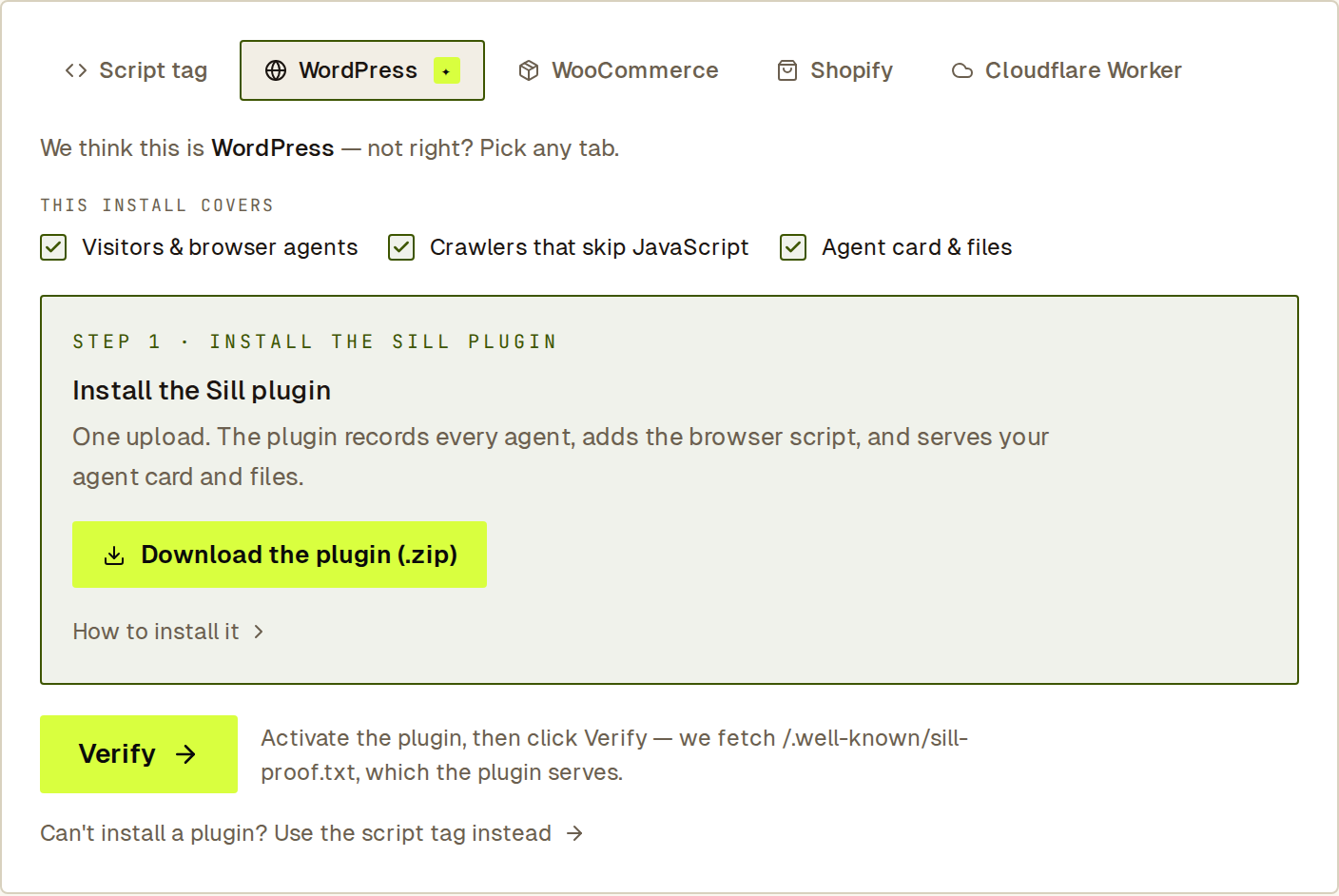 The WordPress tab in onboarding. All three layers are covered by one upload.
Step 1 — Download the plugin
Section titled “Step 1 — Download the plugin”-
In Sill onboarding, open the WordPress install tab (Sill selects it when it detects WordPress). Under STEP 1 · INSTALL THE SILL PLUGIN, click Download the plugin (.zip).
For a site you already added, open Settings → Install and, under MANUAL INSTALL, click Download WordPress Plugin.
-
The file,
sill-agent-ready.zip, is built for your site and already contains your site key and domain-ownership token. Upload it to WordPress as it is; there is nothing to unzip or re-zip.
Step 2 — Upload and activate it in WordPress
Section titled “Step 2 — Upload and activate it in WordPress”- In your WordPress admin, go to Plugins → Add New → Upload Plugin.
- Choose
sill-agent-ready.zip, click Install Now, then Activate Plugin.
The plugin appears in your plugin list as Sill Agent Readiness.
Step 3 — Check that it worked
Section titled “Step 3 — Check that it worked”- Open
https://your-domain/.well-known/sill-proof.txt. A short token means the plugin is serving your files. - If onboarding is still waiting for verification, click Verify on the WordPress tab. The check reads
/.well-known/sill-proof.txt, which the plugin serves, so there is nothing to paste. - In Sill, open Settings → Install → How Sill is installed. Visitors & browser agents, Crawlers that skip JavaScript (
live · WordPress plugin) and Agent card & files turn live as traffic arrives. Click RE-CHECK to refresh.
The plugin registers its paths when you activate it, so /.well-known/sill-proof.txt, /llms.txt and /agent answer straight away. If one of them still returns your theme’s 404 page (some caching or permalink plugins hold on to old URL rules), go to Settings → Permalinks in WordPress and click Save Changes once without changing anything, then clear your page cache.
Connect WooCommerce
Section titled “Connect WooCommerce”The plugin covers discovery. Connecting WooCommerce lets agents read your catalog, check availability, and look up order status and shipments.
- In your WordPress admin, go to WooCommerce → Settings → Advanced → REST API and click Add key.
- Set Permissions to Read/Write if agents will place orders through Sill, or Read for catalog and order lookups only. Generate the key.
- In Sill, open Settings → Integrations → WooCommerce (or the WooCommerce install tab in onboarding). Enter STORE URL, CONSUMER KEY and CONSUMER SECRET, then click Connect WooCommerce.
The card shows CONNECTED, and the catalog skills switch on after the first sync.
WooCommerce orders placed by agents are paid through Stripe. To turn on place_order and request_refund, also connect Stripe under Settings → Integrations. See Connect payments.
Files the plugin serves on your domain
Section titled “Files the plugin serves on your domain”/.well-known/agent-card.json— your signed agent card./.well-known/sill-proof.txt— the domain-ownership token./.well-known/ucp— your UCP business profile./.well-known/mcp/server-card.json— a pointer to your MCP server./.well-known/ai-catalog.json— your signed ARD catalog./ai-catalog.jsonanswers at the same place for older clients./.well-known/api-catalog— an RFC 9727 linkset to your agent card, MCP server and signed catalog./llms.txt— your plain-language summary for language models./agent— an HTML page for assistants that read pages rather than JSON.
The plugin also adds discovery <link> tags to every page’s <head>. To stop it adding the embed script (for example, because your theme already includes the snippet), return false from the sill_inject_embed filter.
What the plugin sends to Sill
Section titled “What the plugin sends to Sill”For each request from a crawler or agent, plugin version 1.4.0 sends Sill:
- The page path and query, the user agent, the address your server saw the request come from, the visitor address Cloudflare passed along (if any), and whether a proxy header was present. Sill uses the Cloudflare address only when the request really came through Cloudflare.
- The names of the request headers (names only, never their values), and the values of the
Accept,Accept-Language,Accept-EncodingandFromheaders, shortened. - The encryption protocol and cipher of the connection, when your web server makes them available to WordPress. Many hosts do not; the plugin then sends nothing for them.
- The response status WordPress returned.
The plugin cannot see the lower-level connection details the Cloudflare Worker sends. For agent analysis Sill stores the network block an address belongs to and a keyed fingerprint of the address (one that cannot be turned back into the address without a key only Sill holds), not the address itself; these are removed through Sill’s data-retention process. The visit record itself still holds the full address until that process removes it from older records.
Signed reports and install keys
Section titled “Signed reports and install keys”Each plugin download gets its own key, and the plugin signs every report it sends to Sill with it, so Sill can tell your reports apart from anyone else’s.
- Downloading the plugin again issues a new key. The previous key keeps working until you replace the plugin. At most two keys are active; the oldest is retired when a third is issued.
- To see or revoke keys, open Settings → Install and find INSTALL KEYS below MANUAL INSTALL. Only owners and admins see these controls.
- A plugin whose key is revoked, or an older plugin without a key, keeps working. Sill still records its reports; they are just not marked as coming from your install.
Because the plugin file contains its key, keep the .zip private.
Update the plugin
Section titled “Update the plugin”Older plugin versions keep working, but only 1.4.0 sends the details above and signs its reports. To update, download the plugin again from Settings → Install → MANUAL INSTALL, then in WordPress deactivate and delete Sill Agent Readiness, upload the new sill-agent-ready.zip and activate it. Revoke the old key under INSTALL KEYS afterwards.
When WordPress is behind Cloudflare
Section titled “When WordPress is behind Cloudflare”Use the Cloudflare Worker instead of the plugin. The Worker runs before Cloudflare’s cache, so it sees every request, adds the embed to every page and serves the same files. You can still connect WooCommerce under Settings → Integrations; the connector does not need the plugin.
See also
Section titled “See also”- What each install covers — layers and the minimum install for each kind of site.
- Install the Sill Cloudflare Worker — for WordPress behind Cloudflare.
- Let AI crawlers through your firewall — when a security plugin or WAF returns 403 to AI crawlers.