Visits panel
The visits panel is the list in Activity that shows who has visited your site. Each AI agent, crawler or tool gets one row, however many times it came, so a busy crawler does not bury everything else. Filters narrow the list to AI agents, search engines, SEO tools, suspicious senders, orders or people, and a quiet Probing pill marks the few senders that went looking for secret files.
Open Activity in the top navigation. The panel shows the site selected in the site switcher.
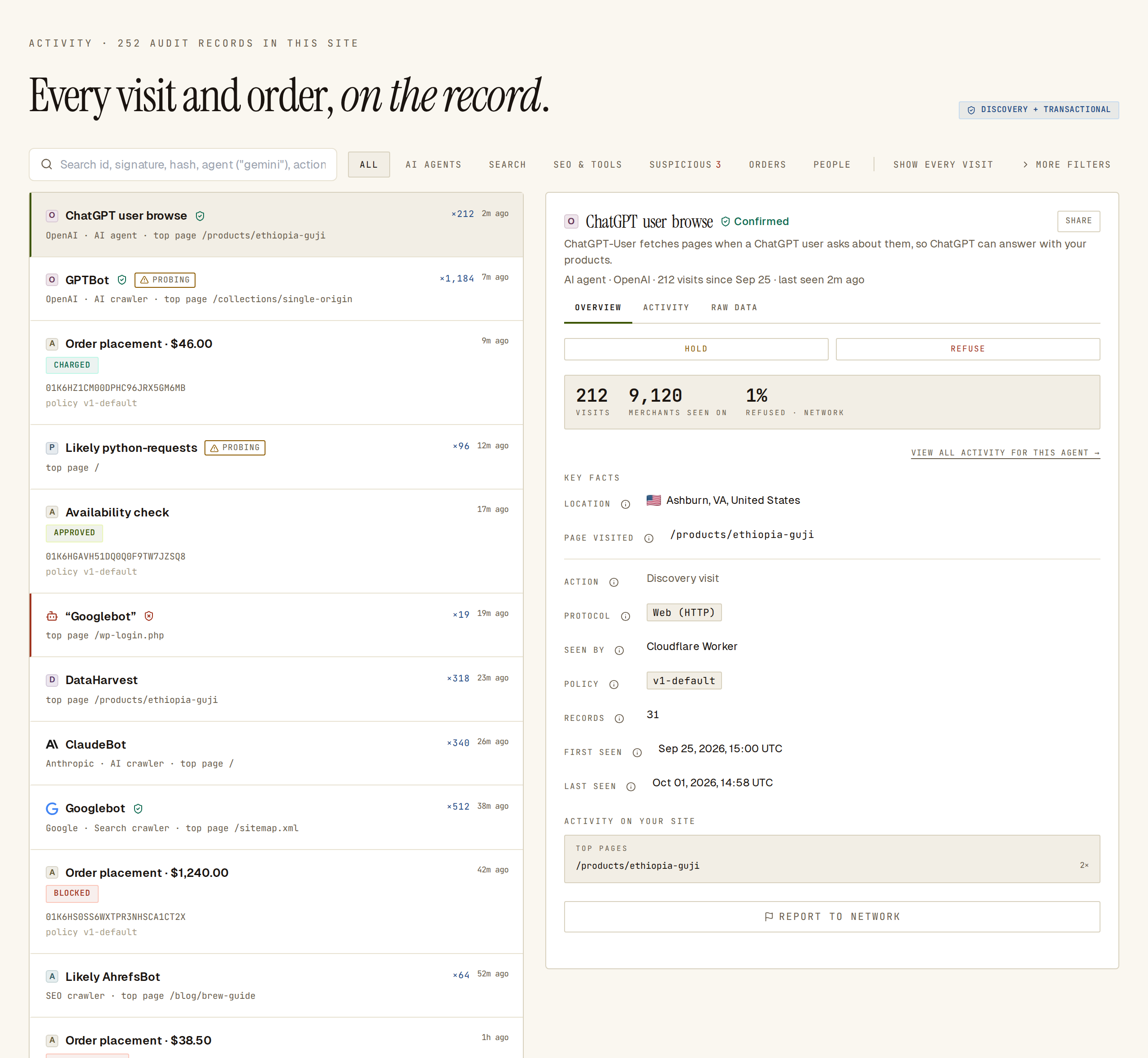 One row per agent or bot. The open row’s details are on the right.
Read a row
Section titled “Read a row”Each row shows:
- A logo. Well-known agents show their brand mark. Other agents Sill has reviewed show their company’s site icon. Anything else gets a lettered tile, so every row is easy to tell apart. People show their country’s flag. Sill’s own tools show the Sill logo.
- The name. A registered agent shows its name, for example GPTBot or ChatGPT user browse. A bot that is not in Sill’s registry shows the name it sends, for example Unknown bot · python-requests, or Likely … when Sill can tell what it probably is. Sill’s own tools read Sill · tool, for example Sill · Site scanner.
- Identity marks, when there is something to say (see Identity marks).
- How many visits (for example ×1,184) and when it was last seen.
- A second line with the company, the kind of visitor (AI agent, AI crawler, Search crawler, SEO crawler, Sill tool and so on) and its most-visited page.
Orders and other signed actions keep one row each, with an outcome pill such as CHARGED or ESCALATED → APPROVED; see Audit log and export.
Identity marks
Section titled “Identity marks”| Mark | Meaning |
|---|---|
| Confirmed (green shield) | Sill proved the visit came from the agent it names: a valid signature, or an address on the company’s published list. On a row, hover the shield to see in how many of the row’s visits. |
| Mismatch (red shield, name in quotes) | The visit used a known agent’s name but Sill has evidence it came from someone else, for example an address the company doesn’t publish or a signature that failed. Mismatches get their own row, so the real agent’s row stays clean. |
| No mark | Sill could not prove either way. This is normal: many genuine bots offer no way to check them. |
How Sill checks an agent, and which installs can check what, is explained in Identifying agents.
If trust labels are turned on for your site, rows also carry the agent’s trust label, the same one shown in Agents. Trust labels are off by default; see Trust labels and disputes.
Filter the list
Section titled “Filter the list”The chips above the list:
| Chip | Shows |
|---|---|
| ALL | Every agent, bot and order. People have their own chip. |
| AI AGENTS | AI assistants and AI crawlers, such as ChatGPT, Claude, Perplexity and GPTBot. |
| SEARCH | Search engine crawlers, such as Googlebot. |
| SEO & TOOLS | SEO crawlers, uptime monitors, link previews and Sill’s own tools. |
| SUSPICIOUS | Rows with a Probing pill and every Mismatch row. The number next to it is how many. |
| ORDERS | Orders, refunds and other signed actions. |
| PEOPLE | Human visitors; see People. |
Bots Sill cannot place in a category appear under ALL only.
MORE FILTERS opens:
- IDENTITY — ALL, CONFIRMED or MISMATCH.
- STATUS — ALL, APPROVED, REJECTED, ESCALATED or OBSERVED.
- A date range.
The search box finds a record by id, signature or hash, an agent by name (for example gemini), or an action (for example place_order).
Show every visit
Section titled “Show every visit”SHOW EVERY VISIT switches from one row per agent to one row per signed record, newest first, which is useful for audits and exports. Click it again to go back. In this list a person’s visit reads Visitor from city, with the browser and system, for example Chrome on Mac, and a country flag.
Probing alerts
Section titled “Probing alerts”Some senders request files that no visitor should ask for, such as /.env, /.git/config or private keys, looking for a way in. Sill records these requests; it does not block them. To keep the list calm, the amber Probing pill appears only when it matters:
- A sender with no known name (an unknown bot, a bare browser string or no user agent at all) made at least 5 requests to sensitive paths, and they were at least a quarter of its visits.
- A known agent’s name was used by visits Sill did not confirm, and those visits requested secret or attack files at least 3 times. The real agent never does this, so this means someone is borrowing the name.
On WordPress sites, requests for ordinary WordPress pages such as .php files, /wp-login.php and /xmlrpc.php don’t count, because they are part of your own site.
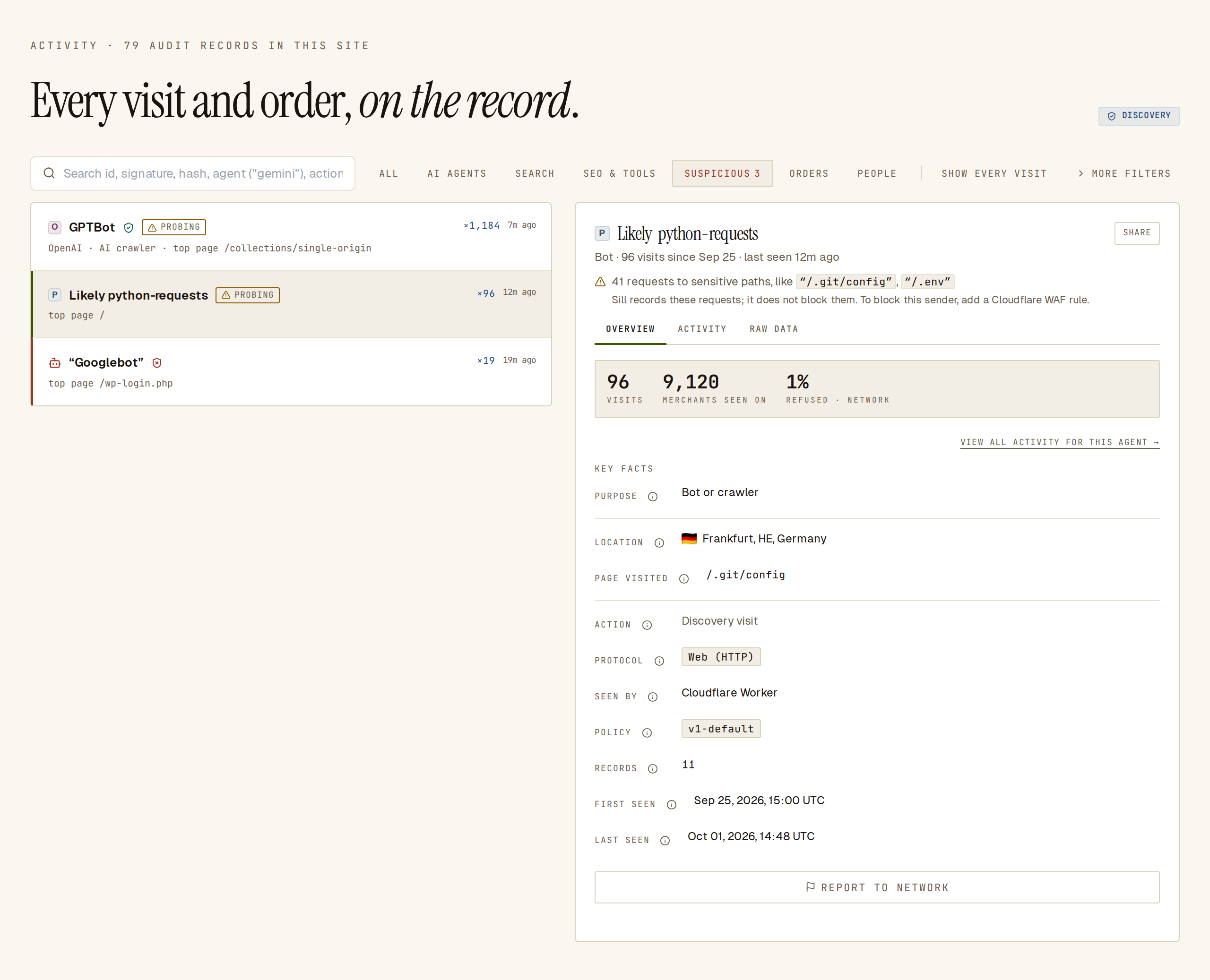 An unknown sender probing for secrets. Sill suggests a firewall rule because no real agent is affected.
What to do about an unknown sender
Section titled “What to do about an unknown sender”Open the row. The line under its name says how many requests went to sensitive paths, with examples, for example 41 requests to sensitive paths, like “/.git/config”, “/.env”. Below it Sill suggests: Sill records these requests; it does not block them. To block this sender, add a Cloudflare WAF rule. See Firewall and WAF.
What to do about an impostor
Section titled “What to do about an impostor”When the alert is on a known agent’s row, the line reads, for example, Someone using the GPTBot name requested secret files like “/.env”. The real GPTBot doesn’t do this; these visits weren’t verified as OpenAI.
Don’t block the name: that would also block the real agent. When the company publishes the addresses its agent uses, Sill adds a hint such as To block the impostor without blocking GPTBot, allow only OpenAI’s verified traffic. Most firewalls can do this with a verified-bot rule; see Firewall and WAF.
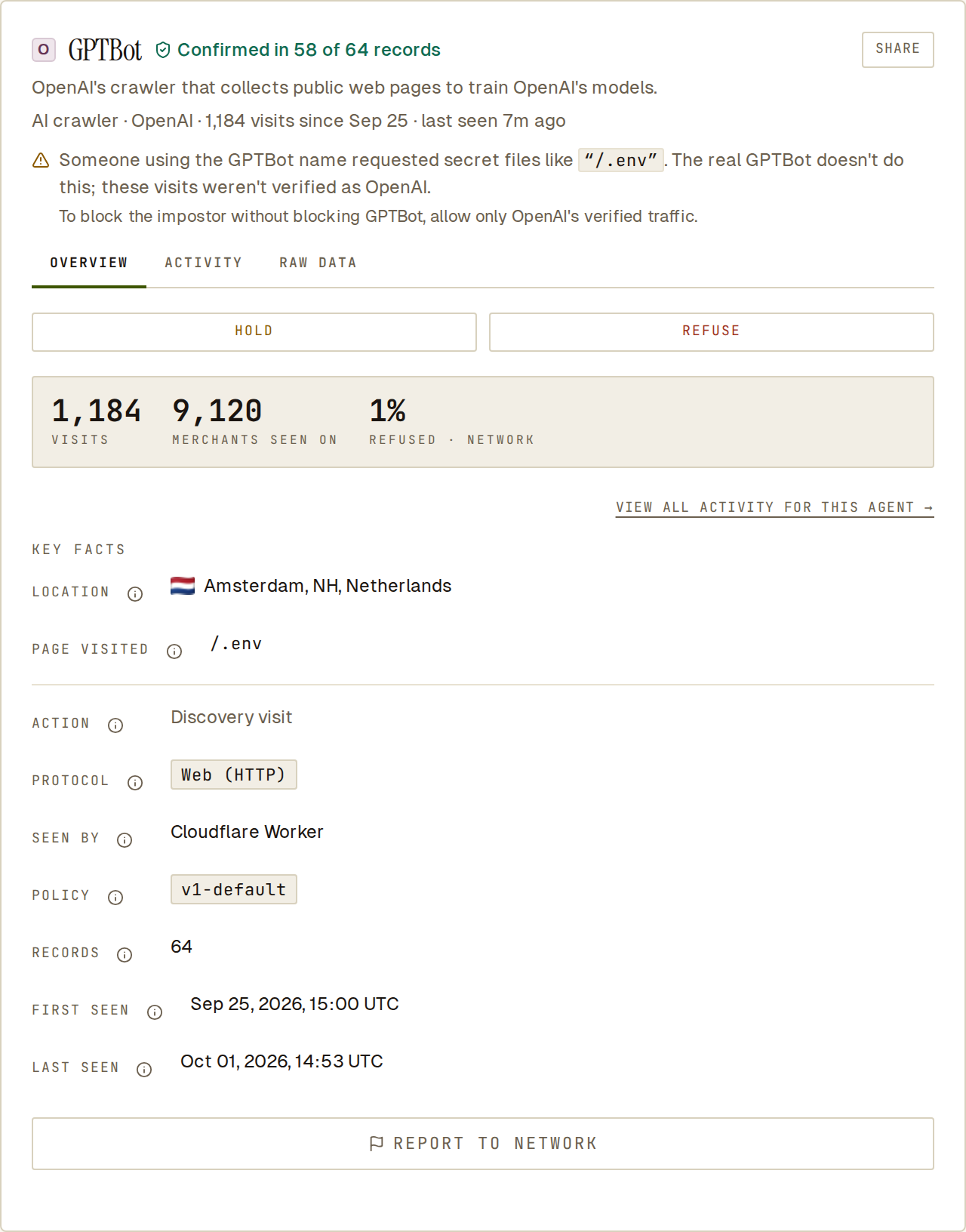 The real GPTBot is confirmed; the probing came from other senders using its name.
The detail panel
Section titled “The detail panel”Click a row to open its detail on the right (on a phone it opens full screen; Back to list returns). The header shows:
- the name and its identity mark;
- a short description of what the agent is and why it visits, for agents Sill has a description for;
- the kind of visitor, the company, how many visits in the period and when it was last seen;
- the Probing line, when there is one.
Below it are three tabs.
OVERVIEW — visit counts, how many other sites Sill has seen the agent on, and the Key facts:
| Fact | What it tells you |
|---|---|
| Location | Where the visit came from, by city, region and country. |
| Page visited | The page on your site. |
| Protocol | How the agent talked to your site. Web (HTTP) is an ordinary page request. MCP, A2A, AP2 or UCP appear only when the agent used your Sill agent endpoints with that protocol. |
| Seen by | Which part of your install recorded the visit: Your site’s script tag, Cloudflare Worker, WordPress plugin, Server-side install, or Sill’s agent endpoint. |
| First seen / Last seen | The row’s oldest and newest visit. |
View all activity for this agent lists every visit from the agent. Report to network reports a sender you don’t trust to Sill; the number of merchants who reported it shows as MERCHANTS FLAGGED.
ACTIVITY — the agent’s visits grouped into sessions and, for orders, the rules that were checked.
RAW DATA — the facts behind the marks, in plain words:
| Row | Example |
|---|---|
| Identity check | Address is on OpenAI’s published list, or Failed. with the reason for a mismatch. |
| Signer | Who signed the request, if it was signed, and whether the signature checked out. |
| Seen by | Cloudflare Worker. |
| Tamper-proof | Sill signed this log entry. |
Then the user agent, the signed record’s values and the export buttons; see Export a signed bundle.
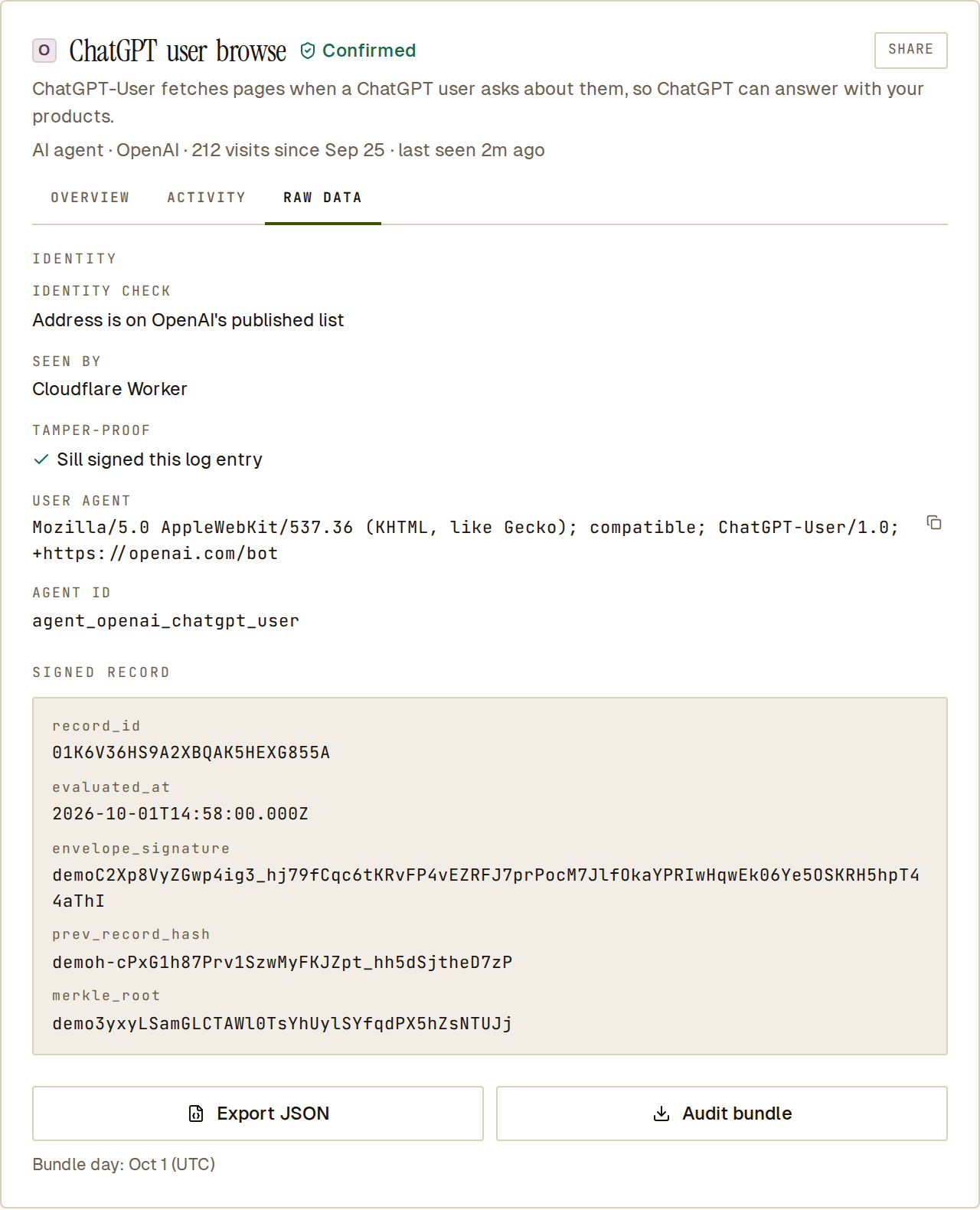 RAW DATA says in plain words how the visit was checked and that Sill signed it.
People
Section titled “People”The PEOPLE chip shows human visitors. Without Returning visitors turned on, all human visits are grouped in one Earlier visitors row with the total number of visits. With it on, each recognised visitor gets a card, for example Visitor from Portland with Chrome on Mac · 11 visits · first seen Aug 28, and a timeline of their sessions. Visits from before you turned it on stay in Earlier visitors.
On a phone
Section titled “On a phone”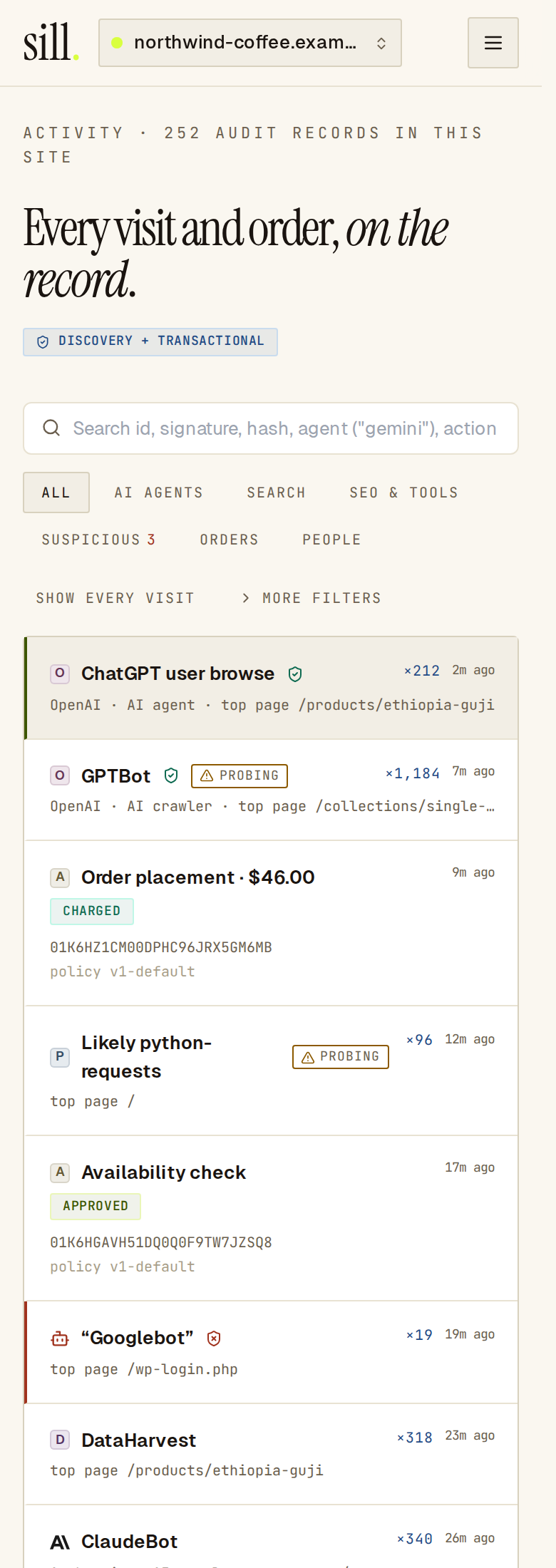 On a phone the chips wrap above the list; tap a row to open its detail.
Common questions
Section titled “Common questions”Why don’t I see every visit as its own row? The panel groups visits by agent so you can see who visits at a glance. Use SHOW EVERY VISIT for one row per signed record.
Does a Confirmed mark mean the agent is safe? It means the visit really came from the agent it names. What the agent does with your pages is a separate question; the description and your rules cover that.
Does Sill block probing? No. Sill records the requests and tells you who sent them. Blocking happens in your firewall.
Why is a Sill tool in my list? Sill visits your site when it scans it, checks your install or confirms you own the domain. Those visits show as Sill · tool, for example Sill · Site scanner, under SEO & TOOLS. See Sill’s own tools.
See also
Section titled “See also”- Returning visitors — recognise people who come back.
- Identifying agents — how Sill names and checks agents.
- Audit log and export — outcomes and signed bundles.
- Agents — traffic and trends per agent.