Redirect the agent card to Sill
Tools that do not run JavaScript, such as ChatGPT’s page fetcher and third-party “agent ready” checkers, look for your agent card at one fixed path on your own domain:
https://YOUR-DOMAIN/.well-known/agent-card.jsonThe Cloudflare Worker and the WordPress plugin serve this file for you. Shopify reserves the path, so a Shopify store uses the app proxy address instead. If you installed only the embed script, add a 301 redirect from that path to your signed card on Sill. A redirect always returns the current card, so it stays right when you change skills. Uploading a copy of the file also works, but you would have to upload it again after every change.
Find your card URL
Section titled “Find your card URL”During onboarding, the Script tag tab’s STEP 2 · SERVE YOUR AGENT CARD shows the redirect for your host with your card URL already filled in. Pick NETLIFY, VERCEL, NGINX, APACHE, WEBFLOW, SQUARESPACE, WIX or OTHER, then copy the rule (file-based hosts have a Copy button).
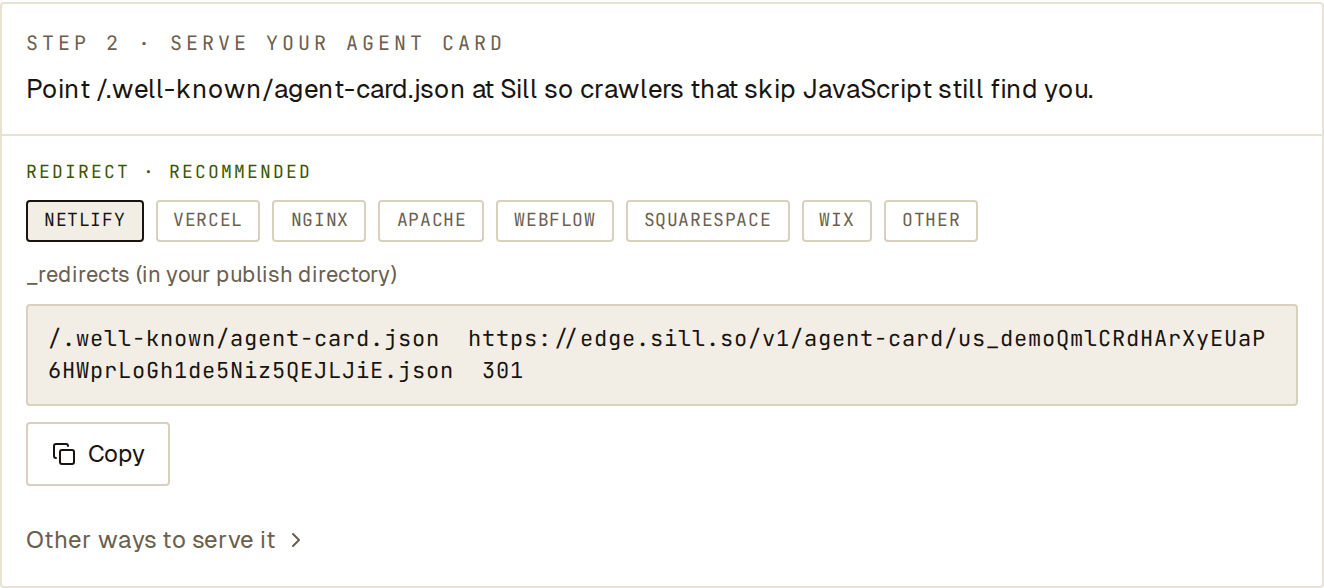 Pick your host and copy the rule. Other ways to serve it has the file download.
Later, find the URL under Settings → Install → Endpoint → Agent card. It looks like:
https://edge.sill.so/v1/agent-card/<your-site-key>.jsonIn the snippets below, replace CARD_URL with it.
Netlify
Section titled “Netlify”Add to the _redirects file in your publish directory:
/.well-known/agent-card.json CARD_URL 301Vercel
Section titled “Vercel”Add to vercel.json:
{ "redirects": [ { "source": "/.well-known/agent-card.json", "destination": "CARD_URL", "permanent": true } ]}Inside your server { } block:
location = /.well-known/agent-card.json { return 301 CARD_URL; }Apache
Section titled “Apache”In .htaccess at the site root:
Redirect 301 /.well-known/agent-card.json CARD_URLWebflow
Section titled “Webflow”In Site settings → Publishing → 301 redirects, set the old path to /.well-known/agent-card.json and redirect to CARD_URL. Add the redirect, then publish the site.
Squarespace
Section titled “Squarespace”In Settings → Developer tools → URL mappings, add the line:
/.well-known/agent-card.json -> CARD_URL 301In Marketing & SEO → SEO → URL redirect manager, set the old URL to /.well-known/agent-card.json and the new URL to CARD_URL. Save.
Any other host
Section titled “Any other host”Look for Redirects or URL mappings in your host’s settings and add a permanent (301) redirect from /.well-known/agent-card.json to CARD_URL. If your host has no redirects, open Other ways to serve it in the onboarding step, click Download agent-card.json and upload the file to /.well-known/agent-card.json. Upload it again whenever you change skills.
Check that it worked
Section titled “Check that it worked”- Open
https://YOUR-DOMAIN/.well-known/agent-card.jsonin a browser. You should land on your signed card onedge.sill.so. - In Sill, open Settings → Install → How Sill is installed and click RE-CHECK. The Agent card & files row reads
agent card redirected.
If the browser shows your site’s 404 page, the redirect rule is not active yet: check that it is saved and published, and that no other rule for /.well-known/ comes before it.