Upgrade or downgrade a site
You change plans one site at a time, from the Billing tab. An upgrade starts right away. A downgrade waits until the end of the period you have paid for.
Change a site’s plan
Section titled “Change a site’s plan”- Open Account settings → Billing.
- Under Your sites, find the site and select Change plan.
- Pick the plan. A line under the choices tells you when it applies and what you pay.
- If this is your first paid plan, choose monthly or yearly next to Bill.
- Select Continue to Stripe to pay by card, or Confirm if your card is already on file.
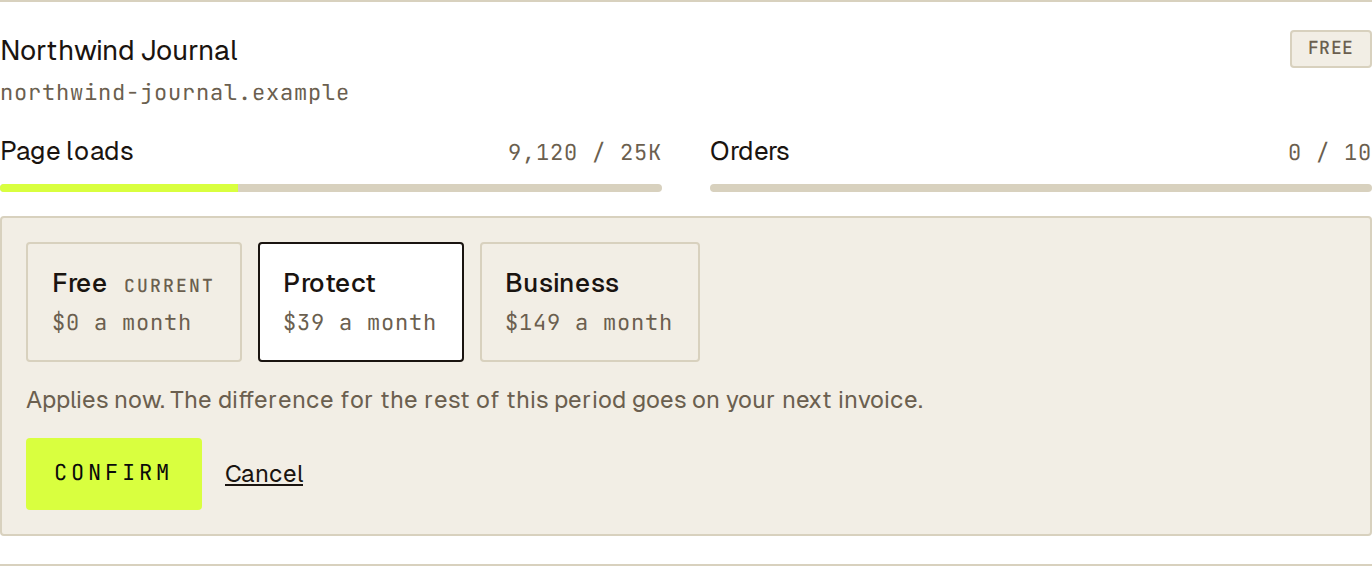 Pick a plan and read the line under it before you confirm: it says when the change applies and what you pay.
After a first payment, Stripe sends you back to the dashboard and the site shows its new plan.
What happens when you upgrade
Section titled “What happens when you upgrade”- The new plan applies now.
- You pay only for the rest of the current period. That amount goes on your next invoice.
- From the next renewal you pay the full price of the new plan.
What happens when you downgrade
Section titled “What happens when you downgrade”This covers any move to a smaller plan, including a move to Free.
- Nothing changes today. The site keeps its current plan until the end of the period you have paid for.
- The site’s row shows Moves to the new plan and the date.
- Nothing is charged and nothing is refunded.
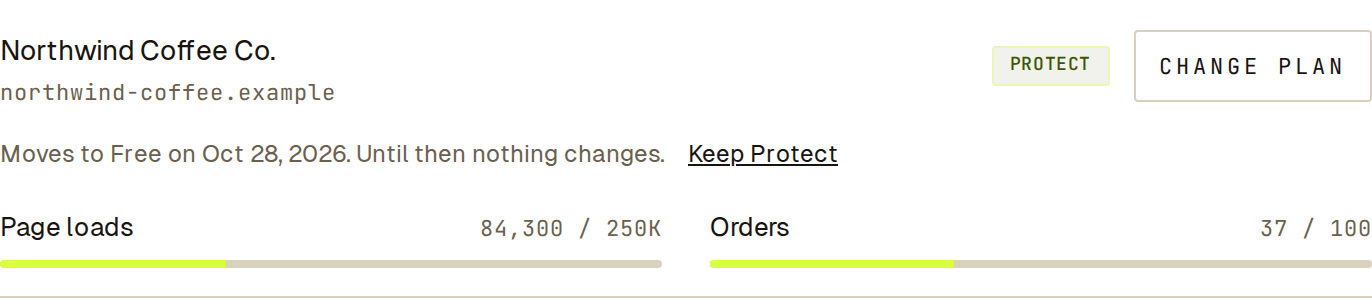 A downgrade waiting for the end of the paid period, with the link that undoes it.
Undo a downgrade
Section titled “Undo a downgrade”Until the date shown, you can change your mind. On the site’s row, select Keep followed by the current plan’s name. The site stays on its plan and nothing else changes.
Switch between monthly and yearly
Section titled “Switch between monthly and yearly”You choose monthly or yearly with your first paid plan, and every paid site follows it. To switch later, email [email protected].
Stop paying for Sill
Section titled “Stop paying for Sill”Move each paid site to Free. Each one stays on its plan until the end of the period you have paid for, then moves to Free. You are not charged for it again.
Your signed records stay available to export.
Deleting your account also stops your paid plans renewing.
If a change does not go through
Section titled “If a change does not go through”| Message | What to do |
|---|---|
| ”Only owners and admins can change plans.” | Ask an owner or admin of the account. |
| ”Too many changes in a short time. Try again in a minute.” | Wait a minute and try again. |
| ”Could not change the plan. Nothing changed.” | Try again. If it keeps failing, email [email protected]. |
If you close Stripe’s page before paying, nothing is charged and the site stays on its plan.