Attack paths
Attack paths stops requests for files no real visitor ever asks for, such as /.env, /.git/config or a webshell, before they reach your server. It works whoever sends the request, so it also stops scanners that switch address every few minutes, where blocking one address at a time can’t keep up.
A refused request gets a plain 404 Not Found with no body and no Sill header, the same answer your site gives for any missing page, so the sender learns nothing.
| Switch | What it does |
|---|---|
| Attack paths (this page) | Refuses requests for attack paths only, from anyone, with a plain not found. No address is blocked: the same visitor can still open every normal page. |
| Blocking | Stops the addresses on your block list from opening any page. They get Access denied from your Cloudflare Worker. |
Who can use it
Section titled “Who can use it”| Install | Attack paths |
|---|---|
| Cloudflare Worker | Yes, version 1.10 or newer |
| WordPress plugin | Yes, version 1.10 or newer |
| Script tag or Shopify app | No |
If your install is older, the card says Update your Worker to 1.10 to refuse requests with your current version. See Cloudflare Worker or WordPress to update.
Watch first, then turn it on
Section titled “Watch first, then turn it on”Attack paths starts off, marked OFF · COUNTING ONLY. Open Security → Paths.
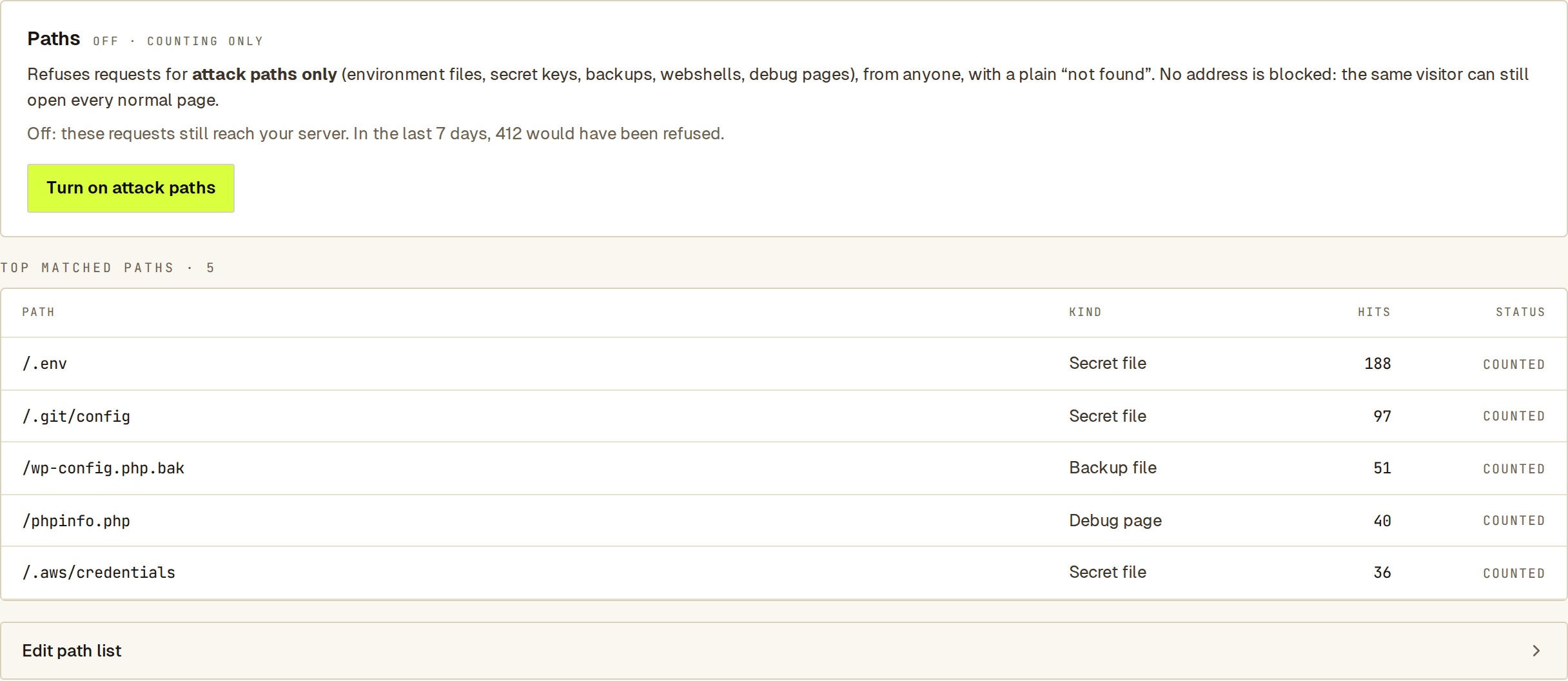 The count shows what turning it on would stop, before you change anything.
- Look at how many requests would have been refused in the last 7 days, and at the TOP MATCHED PATHS table under the card. Each row shows the path, what kind of path it is (secret file, backup file, debug page, WordPress login…), how many times it was asked for, and Counted or Refused. If the table only shows attack paths, nothing your customers use is affected.
- Click Turn on attack paths and confirm. The card then reads ON · REFUSING, the count shows how many were refused in the last 7 days, and the table rows read Refused.
- Turn it off again any time with Turn off attack paths.
Owners and admins can also turn it on from the next steps on the Security summary.
You need the owner or admin role to change it.
What’s on the built-in list
Section titled “What’s on the built-in list”Click Edit path list under the table, then What’s on the built-in list?. It covers:
- environment files such as
/.envand/.envrc; - source-control folders such as
/.git/and/.svn/; - cloud and tool credentials such as
/.aws/and/.ssh/, and private SSH keys; /wp-config*and its copies;- config files that reveal server details, such as
/phpinfo.phpand/web.config; - known webshell names such as
/shell.php; - system paths such as
/proc/self/and paths that climb out of your site with../.
Sill’s own files, such as your agent card and llms.txt, are never refused. Crawlers are not exempt: a crawler asking for /.env is refused like anyone else.
On version 1.13 or newer the built-in list arrives in the same signed file as your custom paths, so Sill can add a new attack class and every site picks it up within a few minutes. Older installs keep applying the list shipped with them until you update, with no loss of protection in between.
Add your own paths
Section titled “Add your own paths”Click Edit path list. Under CUSTOM PATHS, add up to 50 paths to refuse as well, for example an old admin area you no longer use. A path can be exact (/old-admin/login), a prefix (/old-admin/*) or a suffix (*/debug.log). Click Add path, then Save.
The list is delivered to your Worker in a signed file that is not secret, so add paths attackers try rather than naming private areas of your site.
Make an exception
Section titled “Make an exception”If a built-in path is one your site really uses, add it under ALLOW EXCEPTIONS (up to 20). Sill won’t refuse it, even when the built-in list matches. Click Add exception, then Save.
Attack paths or blocking?
Section titled “Attack paths or blocking?”| Attack paths | Blocking | |
|---|---|---|
| Stops | Requests for listed paths, from anyone | Every request from the addresses on your block list |
| The sender sees | A plain 404 not found | 403 Access denied |
| Can still open normal pages | Yes | No |
| Installs | Worker or WordPress plugin, 1.10+ | Worker 1.8+ |
| Best for | Automated scanners, rotating addresses | A sender you want gone entirely |
Most sites should turn on both.
See also
Section titled “See also”- Attack detection — who sent those requests.
- Campaigns — groups of addresses working together.