Security summary
The Security summary answers three questions in one place: did anything get through, are you protected right now, and what should you do next. Open Security in the top navigation; it opens on Summary.
Security has four tabs:
| Tab | What it is |
|---|---|
| Summary | This page. |
| Attackers | Every sender and campaign, by address or by network; see Attack detection. |
| Paths | The attack paths requested, and the switch that refuses them; see Attack paths. |
| Blocking | Your block list and trusted addresses; see Block a sender. |
Pick the period at the top right: 24h, 7d, 30d or 90d.
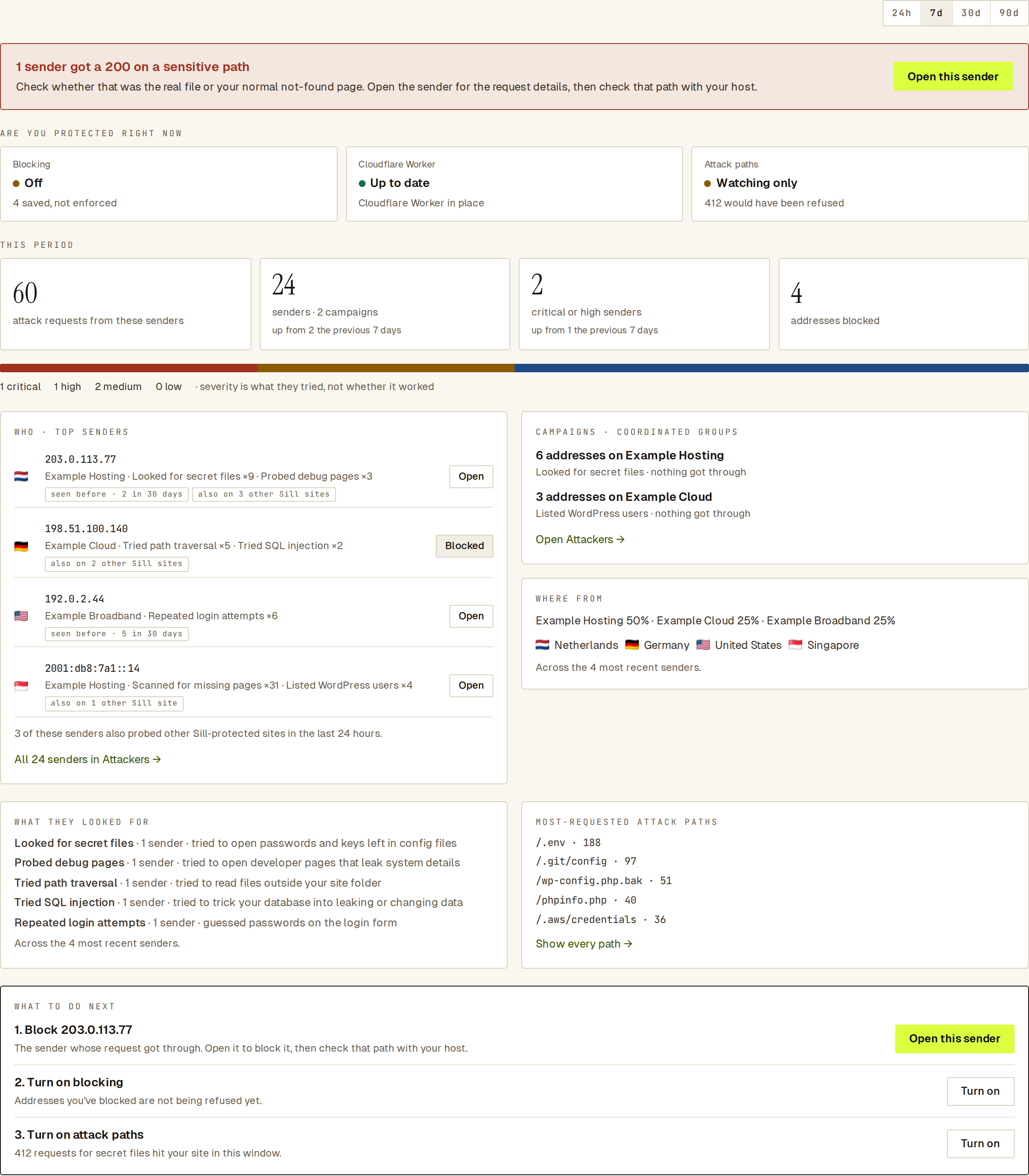 The summary leads with anything that reached your site, then shows whether you are protected and what to do next.
What the summary shows
Section titled “What the summary shows”- Got through. When a sender got a
200on a sensitive path, a red banner says so first and asks you to check whether that was the real file or your normal not-found page. Open this sender has the request details. - ARE YOU PROTECTED RIGHT NOW. Three tiles:
- Blocking: on or off, and how many addresses are saved. When blocking is off, you’ll see N saved, not enforced.
- Cloudflare Worker: up to date, an update available, or not in the request path. The dot stays amber if blocking can’t actually run on your install, even when the switch is on.
- Attack paths: refusing, or watching only, with how many requests would have been refused.
- THIS PERIOD. Attack requests from the senders on the page, total senders and campaigns, critical or high senders, and addresses blocked. The senders and critical-or-high tiles compare to the previous period: up from N the previous 7 days when the previous value is small, up N% vs previous 7 days when there is enough history, same as the previous 7 days when the two match.
- WHO · TOP SENDERS, with Open for each. Each row carries small muted chips when they apply:
- seen before · N in 30 days — this address raised that many alerts here before this window.
- also on N other Sill sites — the same address probed that many other Sill-protected sites in the last 24 hours. Count only; never names.
- A short line below the list sums the fleet count across the senders shown.
- CAMPAIGNS (groups of addresses working together).
- WHERE FROM: the networks and countries the senders came from. The footnote reads Across the N most recent senders when the full list is longer than the loaded page.
- WHAT THEY LOOKED FOR with a plain-language line for each attack class, and MOST-REQUESTED ATTACK PATHS. When fewer than five senders are loaded, the breakdown shows as a short list instead of bars.
What to do next
Section titled “What to do next”WHAT TO DO NEXT lists up to three steps, most important first:
- Block a sender that got a
200on a sensitive path. - Turn on blocking, if you have blocked addresses but blocking is off, or Update the Cloudflare Worker / Set up the Cloudflare Worker if blocking can’t work yet.
- Turn on attack paths, if attack-path requests reached your site. The hint shows how many hit in the current window.
- Review a campaign where a request got through.
Owners and admins can turn on blocking and attack paths right from the summary: click Turn on and confirm. Other roles get a link to the tab instead. When there is nothing to do, it says Nothing to do right now.
The Security card on Overview
Section titled “The Security card on Overview”Overview has a Security card for the last 7 days. It turns red when any sender got a 200 on a sensitive path, and says how many attack requests came from how many senders and whether blocking is on. See what happened opens the summary. On a quiet week it reads Nothing got through this week.
 The card turns red only when something got through.