Impostors and scanners
Two kinds of sender try to hide who they are. Impostors use a well-known name such as GPTBot or Googlebot to get waved through. Disguised scanners pretend to be an ordinary browser. Sill marks both, so you can block them without blocking the real agents or customers they imitate.
Impostors: a known name that isn’t real
Section titled “Impostors: a known name that isn’t real”Many AI agents and search crawlers publish how to check them, by signed requests or by the addresses they use. When a visit uses a known agent’s name but fails that check, Sill shows it as a Mismatch: a separate row with a red mark and the name in quotes, for example “Googlebot”. The real agent keeps its own clean row. See Identity marks.
If an impostor also asks for secret files, its row in Activity is marked Probing, and the panel says so, for example Someone using the GPTBot name requested secret files like “/.env”. The real GPTBot doesn’t do this. The sender can also appear under Security → Attackers as Posed as a known crawler.
Don’t block the name. A rule on the user agent would block the real agent too. Instead:
- open the Mismatch row and block the addresses using the name, from the panel’s Block button; Sill refuses to block addresses it has confirmed belong to the real crawler;
- or turn on Attack paths, which refuses the files the impostor asks for, whatever name it uses.
Disguised scanners: the Unknown scanner row
Section titled “Disguised scanners: the Unknown scanner row”Some tools send a normal browser user agent while asking for files no visitor ever requests, such as /.env or /.git/config. Their name tells you nothing, so Sill collects them in one Unknown scanner row in Activity. It is always marked Probing. It is many unrelated senders, not one visitor; each sender Sill raised an alert on also has its own card under Security → Attackers.
Open the row to see SCANNER ADDRESSES: the 20 addresses with the most recent requests in the last 30 days (or your chosen date range), each with a flag, its city, the number of requests and example paths.
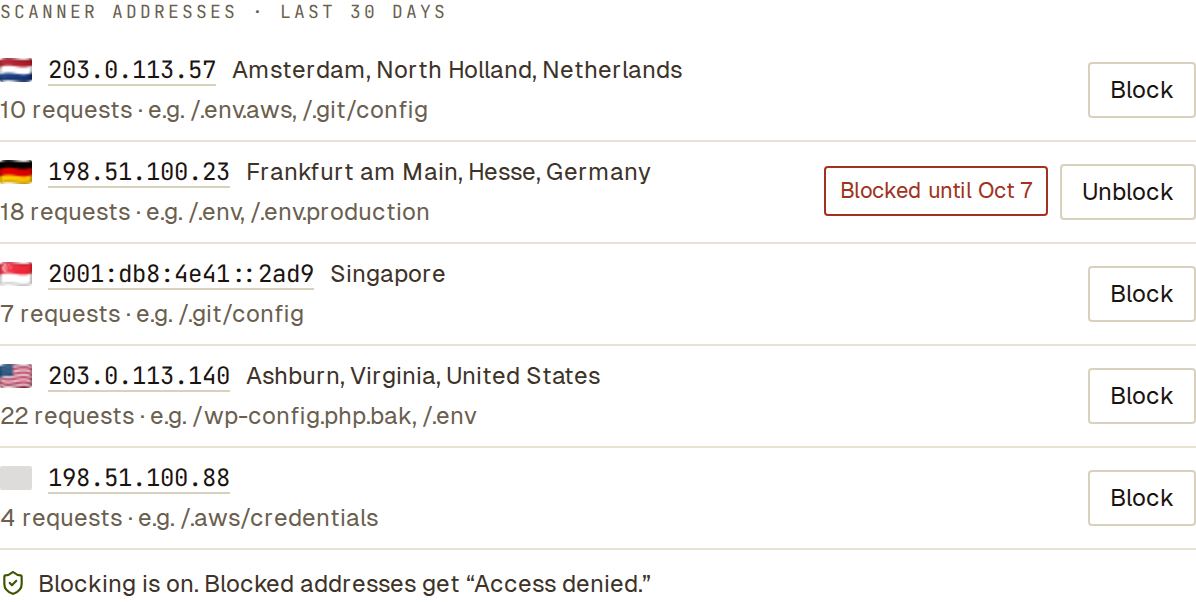 Each address has its own Block button. A grey flag means Sill could not place the address.
- Block blocks that address for 7 days; see Block a sender.
- Click an address to see every visit it made.
- Typing
scannerin the Activity search box finds the row.
The row’s Location and RAW DATA describe its newest visit. Each visit has its own signed record, which you can open from the ACTIVITY tab.
Scanners change address often, so Attack paths usually does more against them than blocking addresses one by one. When several scanner addresses work together, Sill also groups them into a campaign you can auto-block.
See also
Section titled “See also”- Identifying agents — how Sill names and checks agents.
- Attack detection
- Campaigns